



Answer

SQL settings block size greyed out

  • October 20, 2021
  • 2 replies
  • 139 views

KrisVermeulen
Novice
Forum|alt.badge.img+1

Hi,

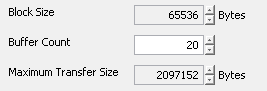
When opening the subclient settings for an SQL server the Block Size and Maximum transfer Size are grayed out. Only Buffercount can be altered.

Any idea on how to change the grayed out values?

Sql version is 2016

Commserve is at 11.22.41

Thanks in advance,

Kris
Best answer by dude

Its an up and down arrow. If you click that, the values will change.


2 replies

dude
Community All Star
Forum|alt.badge.img+15
  • Community All Star
  • Answer
  • October 20, 2021

Its an up and down arrow. If you click that, the values will change.


Forum|alt.badge.img+14

@KrisVermeulen Yes @dude  is correct.

The reason is buffer count can be entered as any value. However, Block size and Maximum Transfer size must be in 64 KB intervals. So that is prevents you from entering an unsupported value. More info on these settings and possible options can be found here:

https://documentation.commvault.com/11.24/expert/18190_enhancing_sql_backup_performance.html



