Solved

Storage Accelerator and Data Domain

  • January 23, 2025
  • 4 replies
  • 160 views

Forum|alt.badge.img+3

Hello All;

I found this topis:


An I have similar problem in with Data Domain, in the logs I found taht StorageAcceleratorAutoDisabledUntil

and i have a question:

Where I can found exactly this keys on Linux and Windows systems?


MediaAgent/StorageAcceleratorAutoDisabledUntil

MediaAgent/StorageAcceleratorConsecutiveFailureCount


I have installed on clients Media Agent and client can communicate with DD.

Best answer by Ponte_Vedra

Hello Pawel,

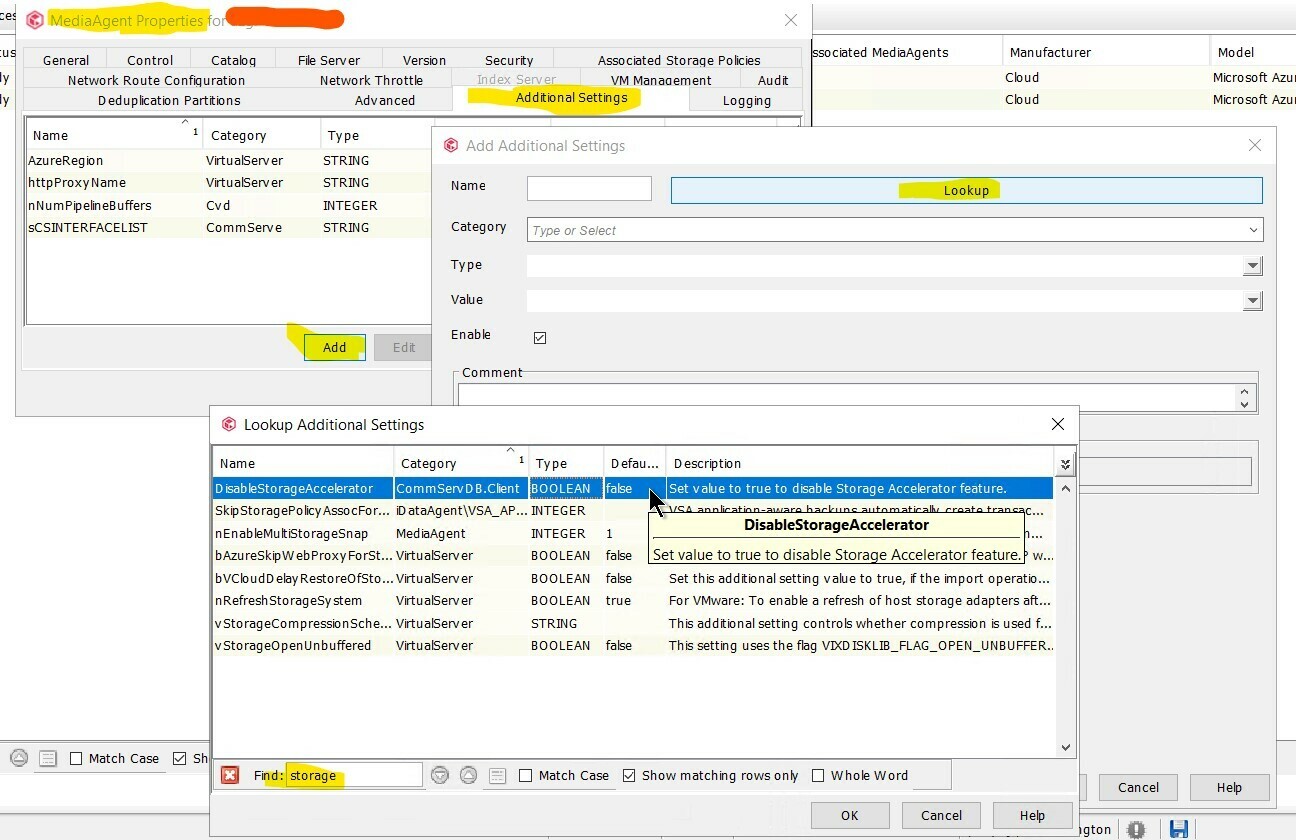
I was able to locate the key to disable storage accelerator - it can be found by navigating to media agent properties → Additional Settings tab → Click Add → Lookup → In the Find text box type storage and it will appear at the top titled DisableStorageAccelerator

Here is a screenshot for reference. Note: Use this same process for Windows or Linux media agents.


I was not able to locae the ConsecutiveFailureCount key - you can try reviewing selections found when using Lookup. It could be a key that requires a support engagement to collect needed details - may be worth checking out if you have no luck hunting it down.


4 replies

RubeckDK
Explorer
Forum|alt.badge.img+11
  • Explorer
  • January 23, 2025

Hi… 


On Linux, the entry is found in the following file:
/etc/CommVaultRegistry/Galaxy/Instance001/MediaAgent/.properties  

On Windows, it is in this registry key:
HKEY_LOCAL_MACHINE\SOFTWARE\CommVault Systems\Galaxy\Instance001\MediaAgent 


/RubeckDK


Forum|alt.badge.img+6
  • Explorer
  • Answer
  • January 23, 2025

Hello Pawel,

I was able to locate the key to disable storage accelerator - it can be found by navigating to media agent properties → Additional Settings tab → Click Add → Lookup → In the Find text box type storage and it will appear at the top titled DisableStorageAccelerator

Here is a screenshot for reference. Note: Use this same process for Windows or Linux media agents.


I was not able to locae the ConsecutiveFailureCount key - you can try reviewing selections found when using Lookup. It could be a key that requires a support engagement to collect needed details - may be worth checking out if you have no luck hunting it down.



  • Novice
  • July 24, 2026

Hi… 


On Linux, the entry is found in the following file:
/etc/CommVaultRegistry/Galaxy/Instance001/MediaAgent/.properties  

On Windows, it is in this registry key:
HKEY_LOCAL_MACHINE\SOFTWARE\CommVault Systems\Galaxy\Instance001\MediaAgent 


/RubeckDK


Thanks Dude for help becasue I stuck on this strange blocks …. Best Regards for Master “KimVault” ;)


RubeckDK
Explorer
Forum|alt.badge.img+11
  • Explorer
  • July 24, 2026

Hi… 


On Linux, the entry is found in the following file:
/etc/CommVaultRegistry/Galaxy/Instance001/MediaAgent/.properties  

On Windows, it is in this registry key:
HKEY_LOCAL_MACHINE\SOFTWARE\CommVault Systems\Galaxy\Instance001\MediaAgent 


/RubeckDK


Thanks Dude for help becasue I stuck on this strange blocks …. Best Regards for Master “KimVault” ;)

You’re very welcome…. dude.. :-)