Answer

The specified Azure application or user doesn't have enough permissions to access KeyVault.

  • February 8, 2022
  • 4 replies
  • 393 views

Forum|alt.badge.img+3

hi,

i created VM and after that i installed Commvault agent.

The backup succeeded a number of times and then it failed with the above error, can anyone tell me what the problem is?

on this VM we are not working with Key Vault 


Best answer by liorkrispin

the problem was solved  - Azure Keyvault was configured with specified networks that can access to the Keyvault , after changed it to allow all  networks the backup job started to work

If you have a question or comment, please create a topic

4 replies

Chris Hollis
Vaulter
Forum|alt.badge.img+14
  • Vaulter
  • February 9, 2022

Hi @liorkrispin 

There may be a misconfiguration on the Azure side. 

Are you able to share the extracts from the vsbkp.log located on the machine attempting to do the backup?

File can be located within the installation dir (default C:\Program Files\Commvault\ContentStore\Log Files). 

If you re-produce the issue (run a backup), wait until it fails, open that file up and share the failure extracts you see (e.g. AzureResourceManagement.BackupKeyOrSecretRestAPI() - User was not found on any access policy for KeyVault.).
 

Let me know if you have any issues accessing/finding the logs.

Thanks, 
Chris 


Forum|alt.badge.img+3
  • Author
  • Novice
  • February 13, 2022

hi Chris,

i cannot find on my client the file name vsbkp.log….

where can i find him?


Chris Hollis
Vaulter
Forum|alt.badge.img+14
  • Vaulter
  • February 13, 2022

Hi @liorkrispin 


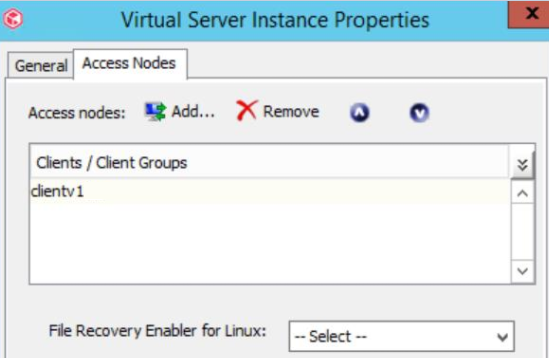
The log will be found on the proxy configured to do the backup.

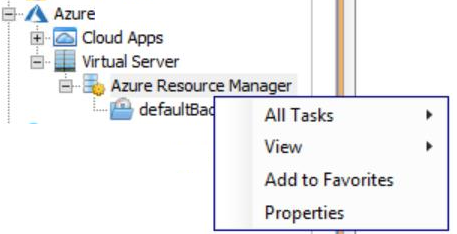
You can find what this is by viewing the Azure Resource Managers properties:


Once you’ve identified the proxy, you can open up the file in the default install directory (C:\Program Files\Commvault\ContentStore\Log Files).


Alternatively, you can right click the job in the GUI > view > logs > if the job is still available / has metadata to retrieve, we can then see the log extracts here (use the ‘select all’ option at the top).


https://documentation.commvault.com/11.24/expert/5573_viewing_log_files_for_active_jobs.html


Let me know how you go.


Chris 


Forum|alt.badge.img+3
  • Author
  • Novice
  • Answer
  • February 15, 2022

the problem was solved  - Azure Keyvault was configured with specified networks that can access to the Keyvault , after changed it to allow all  networks the backup job started to work