Question

Threat Analysis & Tapes

  • September 3, 2025
  • 3 replies
  • 33 views

Forum|alt.badge.img+9

Hi,


I am using Threatscan and my daily Threat Analysis job scan’s my three policy copies 

  1. Primary to disk
  2. AUX to disk
  3. AUX to tape


is there a way for this job to only scan the first copy ? when it gets to the tape copy its looking for tapes that have been removed from the library. 


on version 11.40

3 replies

Forum|alt.badge.img+8

Hi ​@atitagain,

 
By default, Threat Scan scans backups on primary copies. It is not necessary to scan additional copies of backups, since any threat found or marked corrupted will be applied across multiple copies automatically.
Please verify you're not using this additional key 'CICopyPrecedence' (https://documentation.commvault.com/additionalsetting/cicopyprecedence.html).
This setting forces Threat Scan to include secondary or tertiary copies in the scan. If enabled, it would explicitly cause tape copy scanning. If you remove or avoid setting this, job behavior should revert to default—scanning only the primary copy. 


Regards,

Dheeraj


Forum|alt.badge.img+9
  • Author
  • Byte
  • September 5, 2025

@Dheeraj Shetty thanks for your reply, I know about that reg key and its not there. 


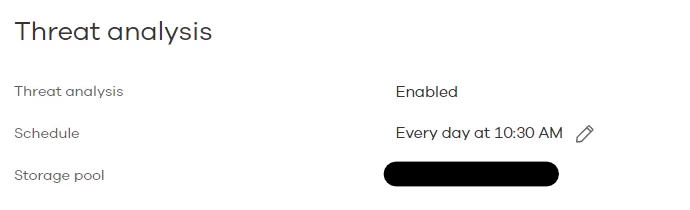
I think I might have found something. I just upgraded to 11.40 a few weeks back and when I had a look at the Threat Scan Plan this morning I noticed that the Storage pool was empty (this entry is new to 11.40). I have now edited it and pointed it as the storage pool when the Primary jobs write to. Hopefully this resolves the issue. 


Onno van den Berg
Commvault Certified Expert
Forum|alt.badge.img+20
  • Commvault Certified Expert
  • September 9, 2025

@atitagain and did it resolve the issue that you were facing?