



Answer

Unable to change physical path on the Command Center

  • November 24, 2021
  • 12 replies
  • 84 views

Forum|alt.badge.img+11

Hi Fellas,

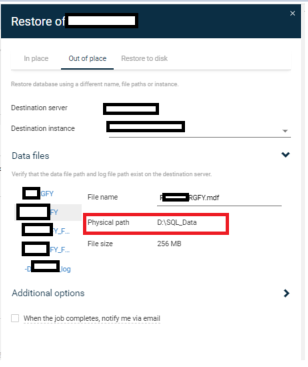
I’ m unable to change physical path DB files separately for the MSSQL Restore on the Command Center which I’ m logged in to “admin”. Anyone has know any idea or suggestions over here?

Thanks.


Best answer by Mike Struening

Sharing case solution:

Finding Details:

Customer wants to be able to specify the file path for each DB files being restored via command center just like how they can do so in the GUI.

Solution:

Informed the customer that this ability isn't included in command center until FR25 or higher. Customer confirmed closure of this case.

12 replies

Aplynx
Vaulter
Forum|alt.badge.img+12
  • Vaulter
  • November 25, 2021

Do you run into the same issue when using the console as opposed to the command center? 


Forum|alt.badge.img+11
  • Author
  • Novice
  • November 26, 2021

I can change it in the console, it's only in Command Center.


Forum|alt.badge.img+15

Hi @0ber0n 

Please would you raise a support case so that we can stage your database and look into this in a little more detail?

If you would private message me the case number, I will track internally from support and then update here for the Community with the outcome.

Thanks,

Stuart


Mike Struening
Vaulter
Forum|alt.badge.img+22

@0ber0n , following up to see if you were able to open a support case for this issue (and if so, if you could share the case number).

Thanks!


Mike Struening
Vaulter
Forum|alt.badge.img+22

@0ber0n , hope all is well!

Following up to see if you were able to open a support case for this issue (and if so, if you could share the case number).

Thanks!


Forum|alt.badge.img+11
  • Author
  • Novice
  • February 10, 2022

@0ber0n , hope all is well!

Following up to see if you were able to open a support case for this issue (and if so, if you could share the case number).

Thanks!


Hi Mike,

Sorry for late response, I couldn’t open a case yet but I will ASAP :)

Best Regards.


Mike Struening
Vaulter
Forum|alt.badge.img+22

Thanks, @0ber0n !


Mike Struening
Vaulter
Forum|alt.badge.img+22

Hey @0ber0n , hope all is well!

I know you’re busy, so consider this a gentle follow up :sunglasses:

Any chance you got this working?


Forum|alt.badge.img
  • Vaulter
  • March 10, 2022

Is your Feature Release up-to-date with the newest Maintenance Release?


Forum|alt.badge.img+11
  • Author
  • Novice
  • March 15, 2022

Hey @0ber0n , hope all is well!

I know you’re busy, so consider this a gentle follow up :sunglasses:

Any chance you got this working?

Hi Mike, finally I have to chance to open a case: 220315-402


Mike Struening
Vaulter
Forum|alt.badge.img+22

You’re awesome, thanks for the follow up!!!


Mike Struening
Vaulter
Forum|alt.badge.img+22

Sharing case solution:

Finding Details:

Customer wants to be able to specify the file path for each DB files being restored via command center just like how they can do so in the GUI.

Solution:

Informed the customer that this ability isn't included in command center until FR25 or higher. Customer confirmed closure of this case.



