
Solved

Unable to log in using Commvault Configuration Helper, InteractiveBrowserCredential authentication failed

  • June 16, 2026
  • 3 replies
  • 35 views

Unique display name
Novice
Forum|alt.badge.img+1

(CV 11.40.46)

Running the Commvault 365 helper to create apps.
First run, it checks prerequisites, installs Microsoft graph module (I think) and asks user to launch the app again.

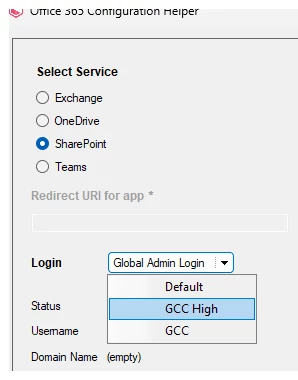
Then trying to click “Global Admin Login”.

It fails.

10:16:12:[pid = 27764]  Current effective execution policy[Unrestricted]. This is should be either 'RemoteSigned' or 'Unrestricted'
10:16:12:[pid = 27764]  Powershell version 5.0 checked.
10:16:12:[pid = 27764]  Microsoft.Graph module checked.
10:16:12:[pid = 27764]  preReqCheck - End
10:16:13:[pid = 27764]  Login button clicked
10:16:13:[pid = 27764]  doLogin - Start
10:16:16:[pid = 27764]  PowerShell script returned error: 'System.Management.Automation.Internal.ObjectReader', 'InteractiveBrowserCredential authentication failed: A window handle must be configured. See https://aka.ms/msal-net-wam#parent-window-handles'
10:16:16:[pid = 27764]  doLogin - End
10:16:16:[pid = 27764]  Failed - Failed to login.Exception excuting script, please check logs.

I have tried from local PC, RDP, and a server through vcenter.

Known issue?

Best answer by Unique display name

Yes, I discovered this after troubleshooting on my own..
The solution was:

PS Uninstall-Module Microsoft.Graph.Authentication -AllVersions -Force
PS Install-Module Microsoft.Graph -RequiredVersion 2.33.0 -Force -Scope AllUsers


You should fix the helper app somehow. Our customers are using it..

Maybe use this when starting the helper the first time:
Install-Module Microsoft.Graph -RequiredVersion 2.33.0 -Force -AllowClobber
Import-Module Microsoft.Graph -RequiredVersion 2.33.0 -Force
and maybe add an uninstall button in the helper to uninstall the old version if the user wants to.

3 replies

Forum|alt.badge.img+17
  • Vaulter
  • June 17, 2026

Hi ​@Unique display name ,

Kindly confirm if the select service is selected as per Agent type and choose GCC High.
https://documentation.commvault.com/2024e/software/create_azure_certificate_for_sharepoint_online.html


Forum|alt.badge.img+6
  • Vaulter
  • June 17, 2026

Hi ​@Unique display name 

Good day!

The system was running Microsoft.Graph module version 2.34.0, which is the latest
available version. Microsoft.Graph v2.34.0 contains a known issue affecting interactive browser
authentication.
The Configuration Helper Tool automatically loads the latest installed module.
Because this version has a defect, the authentication step fails, preventing APP ID creation.

To address the issue: The Microsoft. Graph module should downgrade to a lower version.

Steps To try:

Navigate
to the following path on the affected system:
C:\Users\Documents\WindowsPowerShell\Modules

Remove all Microsoft.Graph module folders from the directory.
Install the
lower version (2.33.0) using PowerShell command:
Install-Module Microsoft.Graph -RequiredVersion 2.33.0 -Scope CurrentUser -Force -AllowClobber

After installing version 2.33.0, the Configuration Helper Tool should function correctly

The development team is currently evaluating whether the tool can be updated to load a specific, predefined module version instead of always defaulting to the latest version


Unique display name
Novice
Forum|alt.badge.img+1

Yes, I discovered this after troubleshooting on my own..
The solution was:

PS Uninstall-Module Microsoft.Graph.Authentication -AllVersions -Force
PS Install-Module Microsoft.Graph -RequiredVersion 2.33.0 -Force -Scope AllUsers


You should fix the helper app somehow. Our customers are using it..

Maybe use this when starting the helper the first time:
Install-Module Microsoft.Graph -RequiredVersion 2.33.0 -Force -AllowClobber
Import-Module Microsoft.Graph -RequiredVersion 2.33.0 -Force
and maybe add an uninstall button in the helper to uninstall the old version if the user wants to.