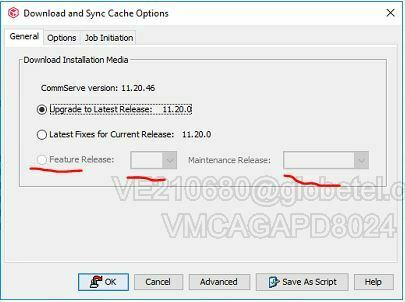
We are schedule to perform cv upgrade to target version 11.24.x. Part of our preparation is to download the target FR from the commcell console in Add/Remove Software but upon checking unable to select feature release from download and sync cache options. It is grayed out.
If anyone who encountered this how do we enable the options so we could proceed to download our target update software.
Regards.
Best answer by Luca Marinoni
Hi r0lansaad,
we have a customer with the same CS version 11.20.46 and he have the same problem.
I did quick hotfix check and I see some download issued solved after HPK 46.
I suggest you run the update manually, it should solve the update problem as well.
In the link below you can find documentation for upgrade on CS with LiveSync environment:
our current cv version is 11.20.46 with configured livesync for high availability. Target version is 11.24.52. Below is what I am referring unable to select the radio button,
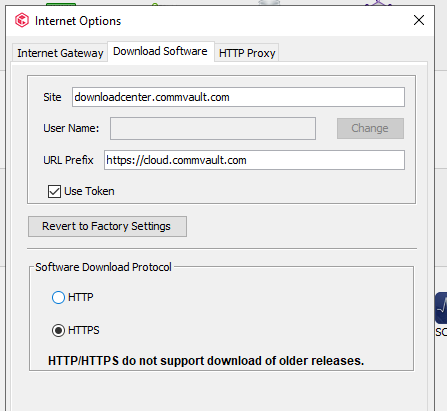
From your screenshot I saw the same in our Commserve internet option. The internet was already temporary allowed by our FW team to two site cloud.commvault.com and downloadcenter.commvault.com and tested fine.
There is nothing found useful info from the logs that could lead us why the radio button to select FR to download is disabled. Can anyone have an idea on how we can fix this?
This is helpful and appreciate the help. We already have a scheduled FR upgrade so I would expect that the issue will also has a fix in our target version. We will manually download the FR 11.24.x and from the installer we will run manual the executable. Hope this known problem will not cause an issue during our Software update to target FR.