Question

Uninstalled Client - Commcell Console still showing the Product Version

  • January 3, 2025
  • 8 replies
  • 62 views

Forum|alt.badge.img+1

Hi Community,

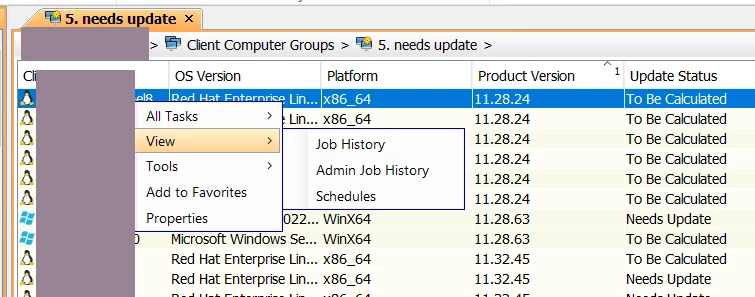
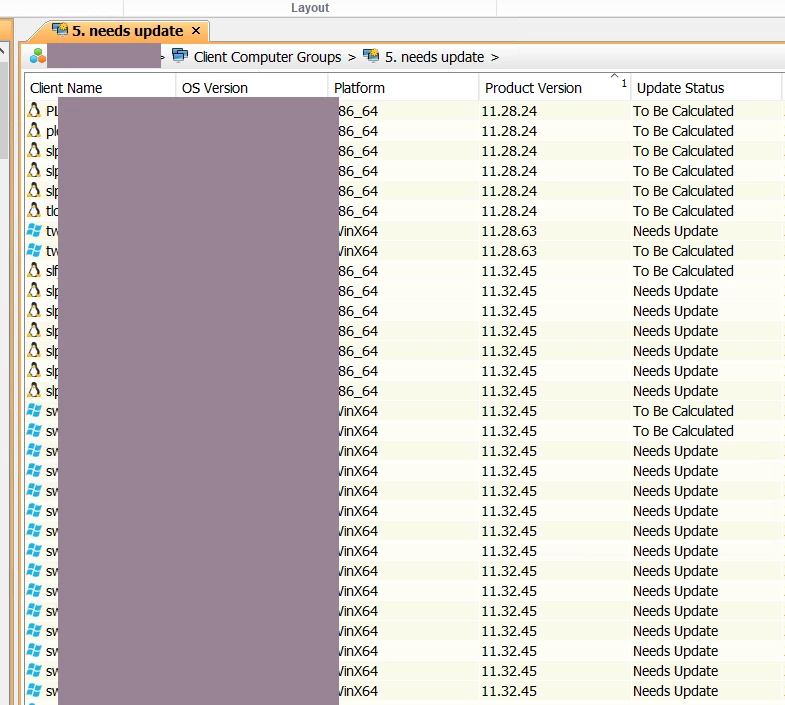
i have uninstalled all Commvault Software as we moved to VSA backup only. In the commcell Console ist still shown with the Product Version. How can i get the Product Version away as my Client Computer Group “needs update” is still showing this Clients with my filter. 


thanks 

8 replies

Forum|alt.badge.img+12
  • Vaulter
  • January 4, 2025

Hi ​@Sebb ,

We need to wait for the respective agent backup jobs to be aged and pruned. Once that process is complete, release the license for the agent installed on the client machine. Afterward, take a new full backup of the VM using the respective VSA sub client and refresh console and re verify.


Aplynx
Vaulter
Forum|alt.badge.img+12
  • Vaulter
  • January 4, 2025

right click all tasks and choose the option to uninstall. 

select the FS iDA and any other products that need to be removed and make sure to check the box to uninstall even if there is no communication. 


Forum|alt.badge.img+1
  • Author
  • Novice
  • January 7, 2025

right click all tasks and choose the option to uninstall. 

select the FS iDA and any other products that need to be removed and make sure to check the box to uninstall even if there is no communication. 

Hi,


this was already done. As you seen in the screenshots above the option is not availbable anymore ad “Commcell” is aware theat no Software is installed anymore


Forum|alt.badge.img+1
  • Author
  • Novice
  • January 7, 2025

Hi ​@Sebb ,

We need to wait for the respective agent backup jobs to be aged and pruned. Once that process is complete, release the license for the agent installed on the client machine. Afterward, take a new full backup of the VM using the respective VSA sub client and refresh console and re verify.


Hi Pradeep, 


thanks for pointing this out, due to retentions up to 10Y this option will not really work 


Rajiv
Vaulter
Forum|alt.badge.img+12
  • Vaulter
  • January 7, 2025

Hello ​@Sebb If you go inside this client, do you see the agent Virtual server or File system?

Best,

Rajiv Singal


Forum|alt.badge.img+1
  • Author
  • Novice
  • January 7, 2025

Hello ​@Sebb If you go inside this client, do you see the agent Virtual server or File system?

Best,

Rajiv Singal

only Virtual Server within the Agent Type


Rajiv
Vaulter
Forum|alt.badge.img+12
  • Vaulter
  • January 7, 2025

Hello ​@Sebb I would suggest you raise a case with support once to see if there is something that can be done since the expiration takes long and this surely something falls under a unique scenario. 

Best,

Rajiv Singal


Aplynx
Vaulter
Forum|alt.badge.img+12
  • Vaulter
  • January 7, 2025

right click all tasks and choose the option to uninstall. 

select the FS iDA and any other products that need to be removed and make sure to check the box to uninstall even if there is no communication. 

Hi,


this was already done. As you seen in the screenshots above the option is not availbable anymore ad “Commcell” is aware theat no Software is installed anymore


I can’t see any of this from the screenshots since the install\uninstall options are under All Tasks and the individual machines are blocked. i do see the version number and some of the machines needing to be updated which doesn’t happen for the virtual server alone.