Solved

Vmware guest file restore fbr mount failed

  • February 9, 2023
  • 6 replies
  • 430 views

Forum|alt.badge.img+7

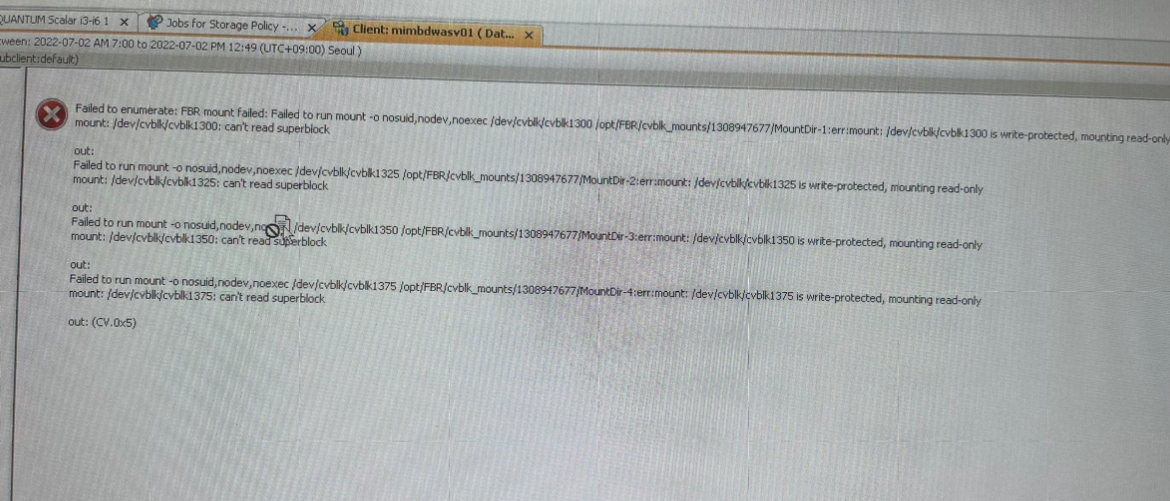
vm backup guest file restore failed.

please any advise


Is the operating system related?

Best answer by Sebastien Merluzzi

Correct, Live Browse might work, but we do not support it anymore.

The other options are to restore the Full VM, VMDK, or to Aux Copy to Disk.

6 replies

Forum|alt.badge.img+14

Hi @chris_ahn ,

It can be anything, for ex when you Registered the FREL, Commserve Client/Host names need to match.

It can be the File System, you can check FS we support:

https://documentation.commvault.com/2022e/expert/32296_live_browse_for_vmware.html

It can be the network/DNS, can you resolve the Commserve and Media Agent from the FREL and cvping/telnet the port 8400?

Is there a Firewall and if so did you configure the Network?

Or you can just log a case and we will check.

Best Regards,

Sebastien


Forum|alt.badge.img+7
  • Author
  • Novice
  • February 9, 2023

The library is a tape, is it related?


primary backup becomes a browse guest file


Forum|alt.badge.img+15
  • Vaulter
  • February 9, 2023

@chris_ahn Without seeing the logs for the job it would be hard to say but I looking at the screenshot I would guess the fact that that the library is tape is not relevant to the error being seen.


Forum|alt.badge.img+14

Live Browse from Tapes is not supported.

https://documentation.commvault.com/2022e/expert/32296_live_browse_for_vmware.html


Note: Live file recovery is only supported for recovery from backups using magnetic disk/cloud libraries, and is not supported from backups to tape libraries or virtual tape libraries.



Forum|alt.badge.img+7
  • Author
  • Novice
  • February 10, 2023

umm…

When i browser data on other history by tape, browse was suceed.

Thank you i will check more


Forum|alt.badge.img+14

Correct, Live Browse might work, but we do not support it anymore.

The other options are to restore the Full VM, VMDK, or to Aux Copy to Disk.