i have set up the Replication for File System Agents, and its working as expected ,
i have only one backup site and replicating from that backup
i would like to know how can i replicate to previous version incase the latest one got affected , also how can i do the validation while or before replication , i dont see any option for Replication for File System Agents.
i have read we can integrate it with 3rd party solution to check , can we do it for this scenario
and also do we need license for this and do we have trial
Best answer by Chris Hollis
@Ajal
As far as I’m aware, there is no revert feature for replication.
However, there are advanced replication options where you can specify periodically (daily, weekly, monthly or yearly).
There doesn’t appear to be instruction or a method for you to revert should there be an issue on the source.
Could you check the above article out for me, follow the procedure and see if the options are available to you to configure? I don’t believe a specific license is required.
However, there are advanced replication options where you can specify periodically (daily, weekly, monthly or yearly).
There doesn’t appear to be instruction or a method for you to revert should there be an issue on the source.
Could you check the above article out for me, follow the procedure and see if the options are available to you to configure? I don’t believe a specific license is required.
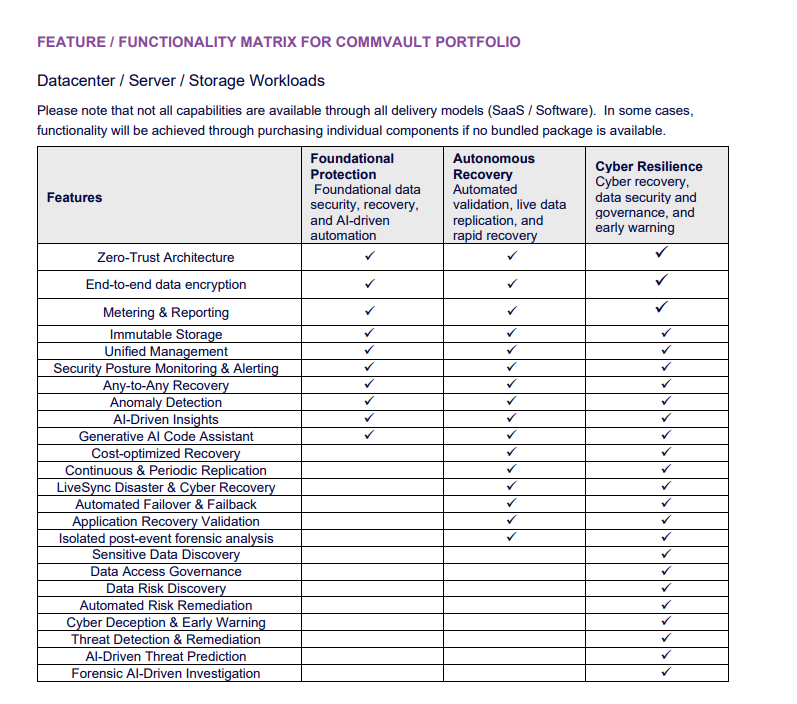
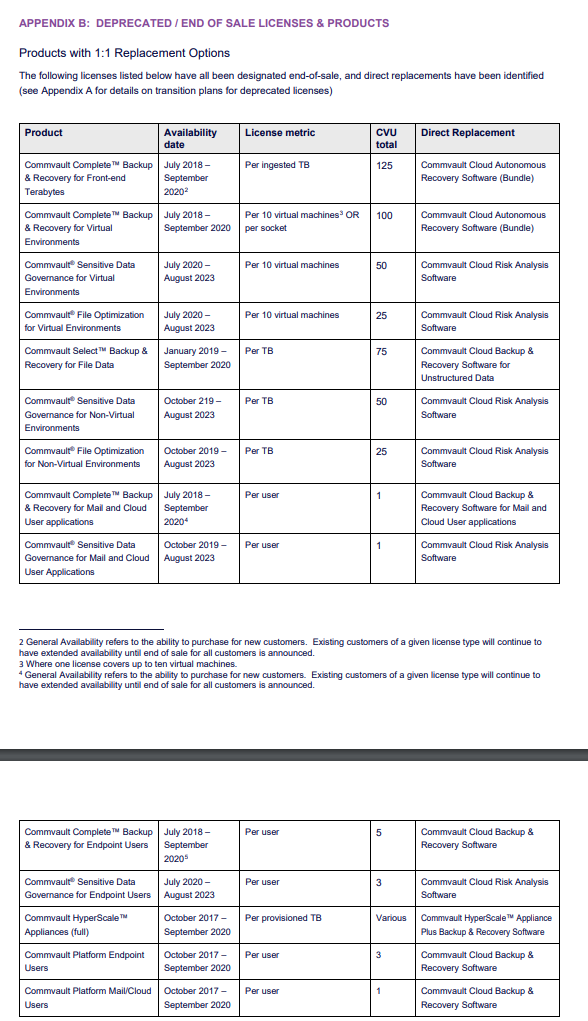
Live Sync / Replication would fall under Autonomous Recovery bundle… this screenshot outlines what Commvault Complete product is replaced by the new bundles…