Answer

Request information about the Content Extractor Package.

  • September 22, 2025
  • 2 replies
  • 41 views

Forum|alt.badge.img+5

Hello. community,


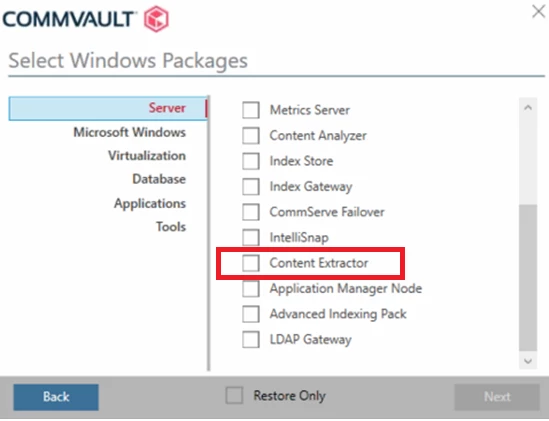
While I am installing CommServe, I noticed the “selection Windows packages” appears Content Extractor. I would to know more about content extractor, I have 3 questios:

  • What is “Content Extractor”?
  • When do I use “Content Extractor”?
  • When i have to install it?
  • Can you share with me links for more information?

I have attached a image for your reference:


Thanks.

Best answer by kkarthikk

Hi ​@Alexis 


1. What is the Content Extractor?


The Content Extractor is a Commvault software package that reads file contents and pulls out metadata like file names, creation dates, and modification dates. It is used in features like Risk Analysis, Sensitive Data Governance, and Case Manager by scanning files for sensitive information to help with compliance, data classification, and eDiscovery.

2. When should I use the Content Extractor?


Use the Content Extractor when you need to:

Find and analyze sensitive data (like PII or credit card numbers) in your environment

Enable features like Risk Analysis and Sensitive Data Governance

Support eDiscovery and compliance tasks through Case Manager

Perform content indexing for advanced search or data classification

3. When do I need to install it?


Install the Content Extractor if:

You're planning to use Risk Analysis, Sensitive Data Governance, or Case Manager

You need to index file contents or extract specific data entities

Note: If you're using the setup wizard and select features that require the Content Extractor, it will be installed automatically—you don’t have to select it manually.

Documenation link:

https://documentation.commvault.com/2024e/commcell-console/installing_content_analyzer_client.html


Content Extractor is part of the Content Analyzer package, which is used for extracting searchable text, metadata, and sensitive entities from files.

Please let me know incase of any queries.

Regards,

Karthik

2 replies

Forum|alt.badge.img+5
  • Vaulter
  • Answer
  • September 23, 2025

Hi ​@Alexis 


1. What is the Content Extractor?


The Content Extractor is a Commvault software package that reads file contents and pulls out metadata like file names, creation dates, and modification dates. It is used in features like Risk Analysis, Sensitive Data Governance, and Case Manager by scanning files for sensitive information to help with compliance, data classification, and eDiscovery.

2. When should I use the Content Extractor?


Use the Content Extractor when you need to:

Find and analyze sensitive data (like PII or credit card numbers) in your environment

Enable features like Risk Analysis and Sensitive Data Governance

Support eDiscovery and compliance tasks through Case Manager

Perform content indexing for advanced search or data classification

3. When do I need to install it?


Install the Content Extractor if:

You're planning to use Risk Analysis, Sensitive Data Governance, or Case Manager

You need to index file contents or extract specific data entities

Note: If you're using the setup wizard and select features that require the Content Extractor, it will be installed automatically—you don’t have to select it manually.

Documenation link:

https://documentation.commvault.com/2024e/commcell-console/installing_content_analyzer_client.html


Content Extractor is part of the Content Analyzer package, which is used for extracting searchable text, metadata, and sensitive entities from files.

Please let me know incase of any queries.

Regards,

Karthik


Forum|alt.badge.img+5
  • Author
  • Byte
  • September 23, 2025

Thank you very much for answer.