



Question

Unable to Browse Users from Exchange DAG Recovery Point

  • August 19, 2026
  • 1 reply
  • 13 views

Forum|alt.badge.img

Hi Team,

We are using the DAG database for Exchange backups. We are currently trying to restore PST files for some users from the DAG Full Backup.

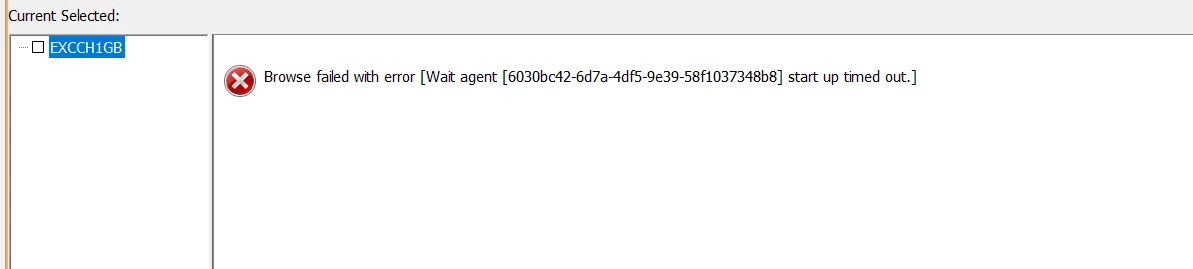
The Create Recovery Point job completed successfully. However, when we open the available recovery point from the List Recovery Points section, we are unable to browse and view the users/mailboxes for recovery.

We have also verified the required prerequisites on the selected MediaAgent, including the Commvault Exchange package and Microsoft Outlook 2013 64-bit, which are installed on the MediaAgent.

Additionally, we attempted the PST restore, but the restore job remains in Running state without any progress/update for more than 30 minutes. The logs indicate repeated messages related to the process not receiving network messages.

We have attached the relevant screenshots and logs for your reference.

Could you please review the issue and advise why the users/mailboxes are not appearing when browsing the recovery point and what steps are required to proceed with the PST recovery?

Environment details:

  • Backup Type: Exchange DAG Full Backup
  • Recovery Point: Created successfully
  • Recovery Operation: Message/PST Recovery
  • MediaAgent: VM1PAP065
  • Commvault Exchange Package: Installed
  • Microsoft Outlook: 2013 64-bit
  • Issue: Unable to browse users/mailboxes from the recovery point and PST restore remains in Running state

Request you to please suggest on this.


1 reply

Forum|alt.badge.img+6
  • Vaulter
  • August 20, 2026

Hi ​@vallapu umesh ,

Good day!

If you want to recover a mailbox or mailbox items (such as a folder, a public folder, a contact, or a calendar entry) from Exchange database backup jobs, then verify that the MediaAgent has the required software.

The MediaAgent must have the following software:

  • The Exchange package (the package can be installed in restore-only mode)

  • Microsoft Classic Outlook (64-bit) all versions for PST restores.

  • Microsoft .NET Framework 4.6.2.

  • Visual C++ Redistributable for Visual Studio 2012 Update 4.

Refer

Preparing the MediaAgent

Alternate Option would recommend you try offline Browse.

1. Restore the Database to any drive X:\Restore Drive in Media Agent, restore to File-without Recovery Option.
2. Right Click on Exchange Client-All task - Recover from Offline Browse
3. Provide the EDB file path which X:\Restore
4 Provide the Log Location path which will a _Restore Folder under X:\Restore\ created in the in the Database Restore.

Submit and check you should be able to see the Mailboxes in the Browse.

Refer:

Recovering Messages from an Offline Exchange Database


-- Please check for any process crash EventID in the time of failure in Media Agent, if so, disable Antivirus and check
-- Update to the latest Maintenance release and check the issue



