Question

DBmaintenance workflow job doesnt want to run anymore - commvault 11.40.67

  • August 12, 2026
  • 11 replies
  • 72 views

Forum|alt.badge.img+11

Please bare with me as Im still a novice in terms of commvault.  I was going to open a case with support but I figured I would post here first to see if anyone could assist.

so our DBmaintenance job doesnt see to want to run like it use to back on 11.32.x

I think this has been going on since we upgraded to 11.40.x from 11.32.x

When the job runs we get the following 

 

I know it said it completed but it also states that it has failed.

I havent tried to run in manually via the cmd line.   Doesnt even send an email.   Guessing something totally changed from 11.32 to 11.40


Thanks

BC
 

11 replies

Forum|alt.badge.img+11
  • Author
  • Apprentice
  • August 12, 2026

Iam successful in running the DBmaintenance from the command line either with the -full or -recommended options.


Forum|alt.badge.img+14
  • Vaulter
  • August 12, 2026

@bc1410 

try updating the workflow with the latest one from https://cloud.commvault.com/commandcenter/#/softwareStore?keyword=dbmaint.

make sure you can get to port 25 on your SMTP host.

also send the log called workflowengine.log from the commserv. 


Forum|alt.badge.img+11
  • Author
  • Apprentice
  • August 12, 2026

Hi ​@Gseibak 

Yes I actually just updated the DBMaintenance workflow as it was saying there was an update available. Now its states that it is “Up to DATE”.  I just tried to run it again and same thing - failed. 

I have tested sending an email that work works successfully.  (via the the email   commcell control panel | Maintenance )


Forum|alt.badge.img+14
  • Vaulter
  • August 12, 2026

send the log called workflowengine.log from the commserv.


Forum|alt.badge.img+11
  • Author
  • Apprentice
  • August 12, 2026

maybe an elementary question but how to just send the workflowengine.log.   Im not seeing the option to just send the workflowengine.log   I told you Im a commvault beginner sort of speak   😀


Forum|alt.badge.img+11
  • Author
  • Apprentice
  • August 12, 2026

@Gseibak  - did you want me to just attach the workflowengine log to this topic?


Forum|alt.badge.img+14
  • Vaulter
  • August 12, 2026

yes please


Forum|alt.badge.img+11
  • Author
  • Apprentice
  • August 12, 2026

@Gseibak  - see attched


Forum|alt.badge.img+11
  • Author
  • Apprentice
  • August 13, 2026

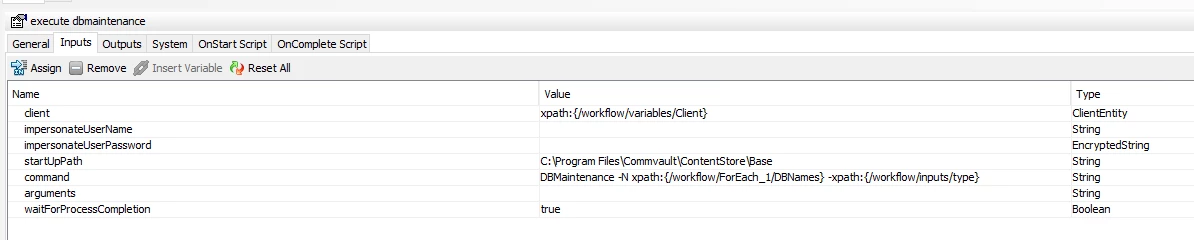
@Gseibak   Is this correct for the workflow DBmaintenance - execute.   I actually added the startUpPath but not even sure if I needed to.  It still fails.


SNIP:


Forum|alt.badge.img+2

hello,

I had the same issue with a customer of mine. 

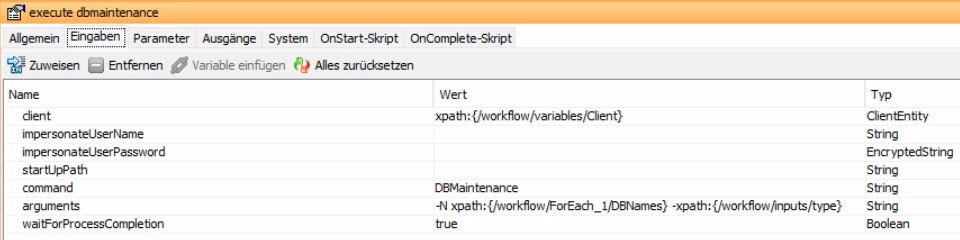
The Issue is that the part ‘-N path….’ does not belong in the Input Field command. It should looking like this.

in later Commvault Versions you have to think about the enhanced security for changes in the workflows.

Enhanced Security for Custom Workflows and Reports

Kind Regards

Florian


Forum|alt.badge.img+11
  • Author
  • Apprentice
  • August 14, 2026

Thanks  ​@Florian Kaiser 


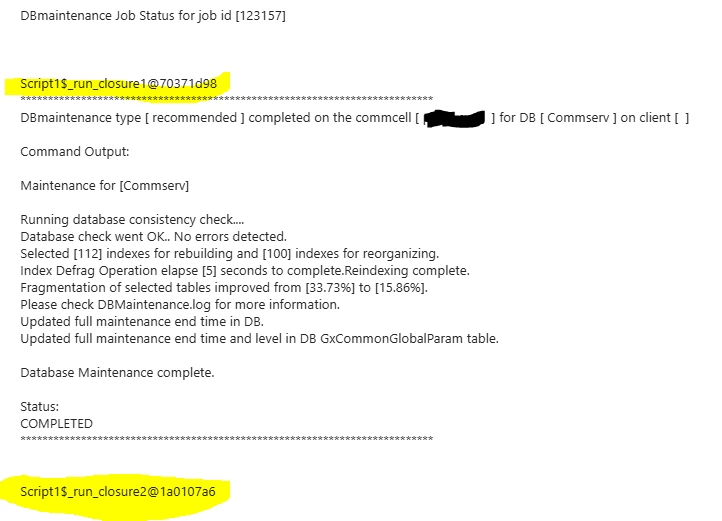
I think Im back to the way it use to be.   But still wondering where this “Script$_run_closure1...” stuff is coming from and why in the email that it auto generates.. 

This is the email results that Im getting.

SNIP:


Thanks

BC