Question

Unable to assign a Plan from Command Center for VM group


Forum|alt.badge.img+3

Hello Team,

We have recently upgraded Commvault to Feature Release 11.44.25. Following the upgrade, we have observed few issues with the new version.

One of the issues identified is related to VM Group Plan assigning

Issue Description:

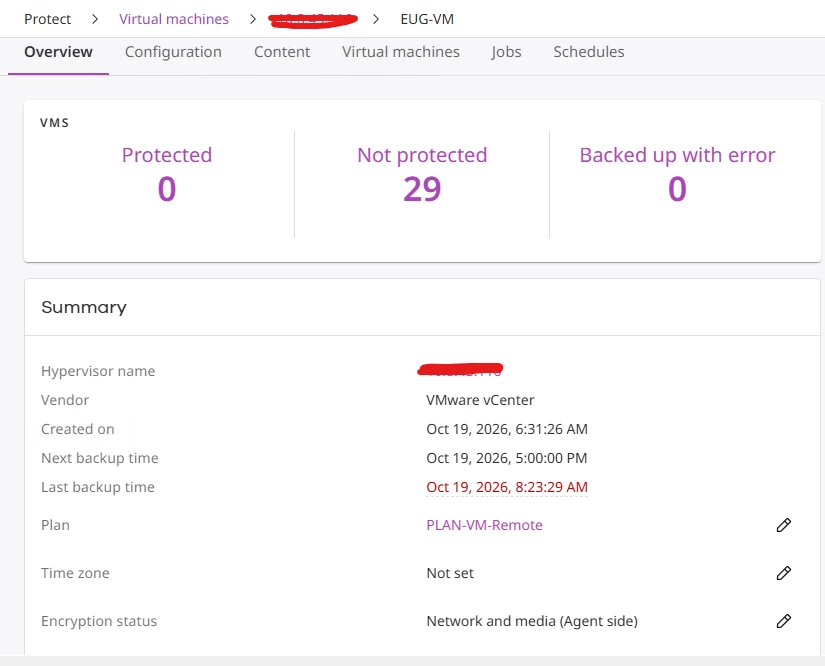
When we create a new VM Group under vCenter and assign a Plan, the configuration is saved successfully. However, the assigned Plan is not reflected correctly in the CommCell. Instead, the Commvault Console automatically associates a different policy and storage pool with the VM Group.

Even if we try to change the correct policy from Console, it will not get changed. 

Under normal circumstances, the policy and storage pool should be assigned based on the configured Region and Plan.

Could you please investigate this behavior and confirm whether this is a known issue in Feature Release 11.44.25? Please also advise if there is any available hotfix or workaround to resolve the issue.

We would appreciate your assistance in identifying the root cause and resolving this issue.

Thank you.


4 replies

Forum|alt.badge.img+17
  • Vaulter
  • October 20, 2026

HI ​@Kumar Devaraj ,

Request you to review Client Group Properties > Storage Device and confirm whether the current configuration is inherited from the Client Group rather than from the associated Plan.


Forum|alt.badge.img+3

Hi Pradeep,

Could you please help me finding this Client Group Properties > Storage Device is it on Command center or Commcell console. 


Forum|alt.badge.img+17
  • Vaulter
  • October 20, 2026

Hi ​@Kumar Devaraj ,

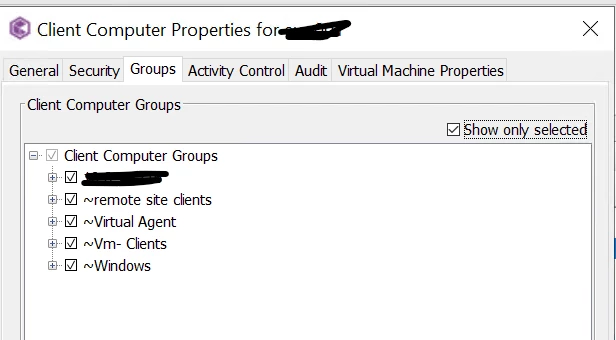
You can find the client group association under the Server Groups section in Command Center. In the Java Console, the same association is listed under Client Groups.

To understand which groups are mapped against the clients. Go to client properties and select the groups tab.


Forum|alt.badge.img+3

Hi Pradeep,

I haven’t noticed anything unusual in the client groups. This issue started occurring only after the upgrade to Commvault 11.44. Before the upgrade, we were able to manage and modify Plans through both Command Center and the CommCell Console without any issues.

We are currently migrating workloads from one vCenter to another, so we need to reconfigure the backups for the migrated workloads. As part of this activity, we are creating new subclients/VM groups and assigning the corresponding Plans based on the existing configuration in the old vCenter.