Solved

Upgrade 11.24 -> 11.38, one step?

  • Apr 14, 2025 6:53 AM UTC
  • 3 replies
  • 213 views

Henk22
Vaulter
Forum|alt.badge.img+3

One of our customers is still on 11.24. They want to upgrade to 11.38. Is this possible in one step? Or is it better to do this in more steps?


Thanks!

Best answer by Javier

As per documentation, you should be able to do a direct upgrade from FR24 to FR38
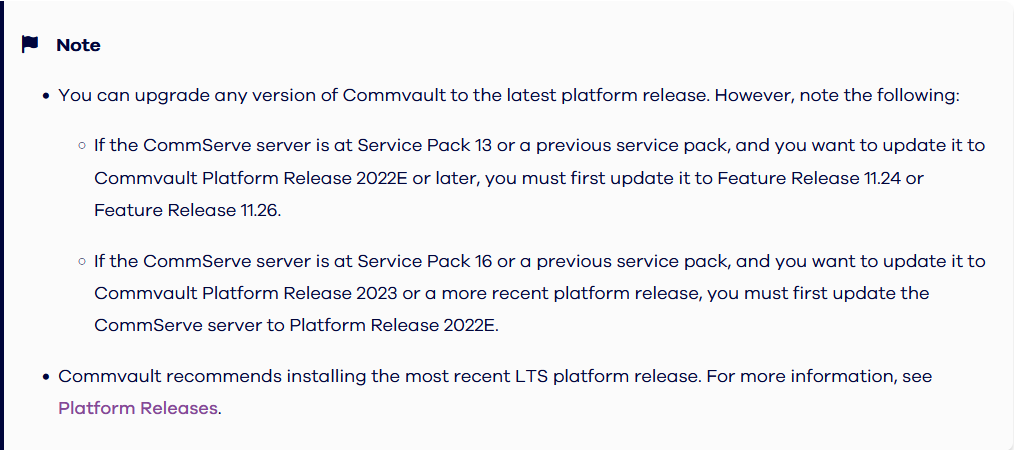
 

https://documentation.commvault.com/11.38/expert/upgrading_commserve_computer.html#upgrade-to-the-latest-platform-release


As ​@CV_GK has mentioned however, I would make sure the current hardware meet the system requirements before the upgrade.

https://documentation.commvault.com/11.38/expert/preinstallation_checklist.html


In addition, please keep in mind FR38 is a Technology Preview releasing, meaning it will have the latest feature but also it will reach EoL sooner. You may want to consider moving to an LTS Release instead.

View original

3 replies

CV_GK
Vaulter
Forum|alt.badge.img+7
  • Vaulter
  • Apr 14, 2025 12:24 PM UTC

Hi ​@Henk22

Please check compatibility first before planning upgrade


Forum|alt.badge.img+15
  • Vaulter
  • Answer
  • Apr 15, 2025 11:16 AM UTC

As per documentation, you should be able to do a direct upgrade from FR24 to FR38


https://documentation.commvault.com/11.38/expert/upgrading_commserve_computer.html#upgrade-to-the-latest-platform-release


As ​@CV_GK has mentioned however, I would make sure the current hardware meet the system requirements before the upgrade.

https://documentation.commvault.com/11.38/expert/preinstallation_checklist.html


In addition, please keep in mind FR38 is a Technology Preview releasing, meaning it will have the latest feature but also it will reach EoL sooner. You may want to consider moving to an LTS Release instead.


Henk22
Vaulter
Forum|alt.badge.img+3
  • Author
  • Vaulter
  • Apr 16, 2025 6:28 AM UTC

Thanks Javier! This all makes sense!