Question

Windows Agent version on a Innovative Release Commvault Server

  • Oct 30, 2026 10:06 AM UTC
  • 3 replies
  • 9 views

Forum|alt.badge.img

Hello,

Due to a technical feature, we plan to use version 11.46 ( innovative version ) and wait for the next LTS version

However, this might cause some additional operational tasks in our side:

.Patch our Commvault Server every 1 or 2 months
.Update agent on Windows Servers 


Based on :

Innovation Release 11.46


Do you have any idea about how to deal with Windows Servers and the installed Commvault agent ?


For instance, if we are on Commvault update release 11.46.30 and we patch the server to the next innovation version 11.46.40

On a on-prem Linux-based server, I think this update might take 1h or 2h

However,  what about the agent on Windows Clients ( File Server for the most part ) ?

Do we have to also update the Windows Agent client on Windows ?


Regards,


Alejandro 



3 replies

Forum|alt.badge.img+19
  • Vaulter
  • Oct 30, 2026 10:18 AM UTC

Updating with a new Maintenance Release a client with a specific agent should take around 5 minutes so not a big deal to be honest no matter if Linux or Windows operating system are your clients or Infraestructure.


Basically you will download the latest MR, update in the following order, Commserve first, Media Agents and then your clients, mostly from the console you will perform this kind of operation.


Forum|alt.badge.img
  • Author
  • Novice
  • Oct 30, 2026 10:23 AM UTC

Hello Leodesp,


Ok

Thanks for your reply.

So, this should be really quick then

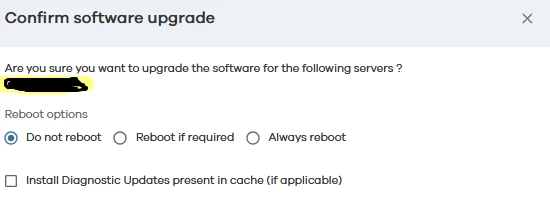
From your reply I understand that no windows restart is needed when you update the Windows Commvault client from a minor version to another.

And that everything can be managed from the console.


Regards,

Alejandro 


Forum|alt.badge.img+19
  • Vaulter
  • Oct 30, 2026 10:47 AM UTC

That is correct. Bear in mind that when updating the software might detect you have pending reboot of your Windows server (for example due to OS updates installed pending reboot) and will skip the upgrade process unless you specify the Reboot if needed option in the upgrade when invoked from the console.