Answer

AWS authentication issues after FR26 upgrade

  • December 27, 2021
  • 8 replies
  • 906 views

Forum|alt.badge.img+11
  • Commvault Certified Expert

Hello,

My demo CommCell was upgraded to FR26 recently and MA is getting AWS authentication issues ever since.


Version: 11.26.3

Storage: NetApp ONTAP S3


CVMA.log
7040  104c  12/27 15:39:06 #####  [DEVICE_IO]  Message: AWS authentication requires a valid Date or x-amz-date header
7040  2d84  12/27 15:39:06 #####  [DEVICE_IO] GetFileSize() - Error: Error = 44106

CloudFileAccess.log
7040  22f4  12/27 15:43:09 ### [CVMountd] OpenFile() - <bucket>/3672BF_06.01.2021_10.33/CV_MAGNETIC/V_3888/CHUNK_152953/SFILE_CONTAINER.idx, mode = READWRITE, error = Error = 44106
7040  28f0  12/27 15:43:09 ### [CVMountd] OpenFile() - <bucket>/3672BF_06.01.2021_10.33/CV_MAGNETIC/V_3044/CHUNK_121116/SFILE_CONTAINER.idx, mode = READWRITE, error = Error = 44106

CloudActivity.log
7040  25b8  12/27 15:42:59 ### [CVMountd]  Message: AWS authentication requires a valid Date or x-amz-date header
7040  2ab0  12/27 15:42:59 ### [CVMountd] GetFileSize() - Error: Error = 44106


What changed with FR26? I already tried with new access keys and it didn’t help. There is not time difference between MA and S3 server. FR24/25 MAs don’t have such issues.

Thank you.

Best answer by euMike

Update - the issue was resolved by installing the Diag2063 on MediaAgent. Big thanks to Karthik and the rest of you guys!

8 replies

Forum|alt.badge.img
  • Vaulter
  • December 27, 2021

It complaining no valid data header. Please set the  debug level 3 for CloudActivity log and rerun the job to get detailed error. Please escalate to Commvault support team  to collect the  log to check this  issue. 


Thanks

Karthik  


Forum|alt.badge.img+11
  • Author
  • Commvault Certified Expert
  • December 28, 2021

Hi Karthik,

No option to open support ticket due to NFR license.

I tried downgrading MediaAgent back to FR25 and the issue was resolved immediately. I will wait for aux copy to complete. Then I can upgrade it back to FR26 and collect new logs.

I suspect that FR26 comes with updated/changed date and time classes/JDK or something like that. Can anyone from Commvault confirm this?

Thanks.


Mike Struening
Vaulter
Forum|alt.badge.img+23

@euMike , any luck on the upgrade back to 26?  Tagging @Karthik in case he missed the last reply.


Forum|alt.badge.img
  • Vaulter
  • January 4, 2022

Thanks Mike.

euMike

No  change in that class.  In our local setup it is working fine,   We need the cloudactivity log with debug level 3 when issue is  happening . From the Commvault Process Manager , under Logging tab, select the CloudActivity log and set the debug level to 3. Once  issue is  reproduced  , please revert back the  changes , once you collect the logs   paste the  error  .    

I am not sure what is NFR license restriction to open Ticket .  

Thanks

Karthik


Forum|alt.badge.img+11
  • Author
  • Commvault Certified Expert
  • January 5, 2022

Hi there!

I did some testing.

I tried to create a new cloud library twice - first time with FR25 and then with FR26. Same bucket, service host, credentials.


MA FR26 - failed, date header errors

Host: <s3 service host>
User-Agent: APN/1.0 CVLT/1.1 CVRF/2.0
Accept: */*
x-amz-date: Wed, 05 Jan 2022 18:51:47 GMT
Authorization:XXXXXXXXXXXXXXXXXXXXXXXXXXXXXXXXXXXXXXXXXXXXXXXXXXXXXXXXXXXXXXXXXXXXXXXXXXXXXXXXXXXXXXXXXXXXXXXXXXXXXXXXXXXXXXXXXXXXXXXXXXXXXXXXXXXXXXXXXXXXXXXXXXXXXXXXXXXXXXXXXX
13200 1728  01/05 19:51:47 ### [CVMountd] == cURL Info: Mark bundle as not supporting multiuse
13200 1728  01/05 19:51:47 ### [CVMountd] <= HTTP/1.1 403 Forbidden
13200 1728  01/05 19:51:47 ### [CVMountd] <= Server: NetApp CSS/9.9.1P5
13200 1728  01/05 19:51:47 ### [CVMountd] <= Date: Wed, 05 Jan 2022 18:51:47 GMT
13200 1728  01/05 19:51:47 ### [CVMountd] <= Connection: Keep-Alive
13200 1728  01/05 19:51:47 ### [CVMountd] <= Content-Length: 158
13200 1728  01/05 19:51:47 ### [CVMountd] <= Content-Type: application/xml
13200 1728  01/05 19:51:47 ### [CVMountd] <=
13200 1728  01/05 19:51:47 ### [CVMountd] == cURL Info: Connection #1 to host <s3 service host> left intact
13200 1728  01/05 19:51:47 ### [CVMountd] GET 403 Time:0.019 Size:158 Speed:8117 B/s NAMELOOKUP:0.002 CONNECT:0.013 PRETRANSFER:0.015 STARTTRANSFER:0.015 http://<s3 service host>/<bucket>?delimiter=%2F&prefix=<bucket>%2F
13200 1728  01/05 19:51:47 ### [CVMountd]  Message: AWS authentication requires a valid Date or x-amz-date header
13200 1728  01/05 19:51:47 ### [CVMountd] CVRESTBaseRemoteFile::SetRESTErrorCode() - Error:  Message: AWS authentication requires a valid Date or x-amz-date header
13200 1728  01/05 19:51:47 ### [CVMountd] == cURL Info: Found bundle for host <s3 service host>: 0x1907b9b2f60 [serially]
13200 1728  01/05 19:51:47 ### [CVMountd] == cURL Info: Connection 1 seems to be dead!
13200 1728  01/05 19:51:47 ### [CVMountd] == cURL Info: Closing connection 1
13200 1728  01/05 19:51:47 ### [CVMountd] == cURL Info: Hostname <s3 service host> was found in DNS cache
13200 1728  01/05 19:51:47 ### [CVMountd] == cURL Info:   Trying <s3 service host IP>:80...
13200 1728  01/05 19:51:47 ### [CVMountd] == cURL Info: Connected to <s3 service host> (<s3 service host IP>) port 80 (#2)
13200 1728  01/05 19:51:47 ### [CVMountd] => DELETE /<bucket>/dfaksdhfuq43yAF9834fmabvfjhFDGgv8743rvbfdabuyewbasdfahdDCCZfabdfbchasd HTTP/1.1


MA FR25 - succeeded

Host: <s3 service host>
User-Agent: APN/1.0 CVLT/1.1 CVRF/2.0
Accept: */*
Content-Length: 0
Content-Type: binary/octet-stream
x-amz-acl: private
x-amz-date: 20220105T191538Z
x-amz-content-sha256: e3b0c44298fc1c149afbf4c8996fb92427ae41e4649b934ca495991b7852b855
Authorization:XXXXXXXXXXXXXXXXXXXXXXXXXXXXXXXXXXXXXXXXXXXXXXXXXXXXXXXXXXXXXXXXXXXXXXXXXXXXXXXXXXXXXXXXXXXXXXXXXXXXXXXXXXXXXXXXXXXXXXXXXXXXXXXXXXXXXXXXXXXXXXXXXXXXXXXXXXXXXXXXXXXXXXXXXXXXXXXXXXXXXXXXXXXXXXXXXXXXXXXXXXXXXXXXXXXXXXXXXXXXXXXXXXXXXXXXXXXXXXXXXXXXXXXXXXXXXXXXXXXXXXXXXXXXXXXXXXXXXXXXXXXXXXXXXXXXXXXXXXXXXXXXXXXXXXXXXXXXXXXXXXXXXXXXXXXXXXXXXXXXX
Expect: 100-continue
10592 262c  01/05 20:15:38 ### [CVMountd] == cURL Info: Mark bundle as not supporting multiuse
10592 262c  01/05 20:15:38 ### [CVMountd] <= HTTP/1.1 100 Continue
10592 262c  01/05 20:15:38 ### [CVMountd] == cURL Info: Mark bundle as not supporting multiuse
10592 262c  01/05 20:15:38 ### [CVMountd] <= HTTP/1.1 200 OK
10592 262c  01/05 20:15:38 ### [CVMountd] <= Server: NetApp CSS/9.9.1P5
10592 262c  01/05 20:15:38 ### [CVMountd] <= Date: Wed, 05 Jan 2022 19:15:38 GMT
10592 262c  01/05 20:15:38 ### [CVMountd] <= x-amz-request-id: 3256912554
10592 262c  01/05 20:15:38 ### [CVMountd] <= Connection: Keep-Alive
10592 262c  01/05 20:15:38 ### [CVMountd] <= Content-Length: 0
10592 262c  01/05 20:15:38 ### [CVMountd] <= Content-Type: text/html
10592 262c  01/05 20:15:38 ### [CVMountd] <= ETag: "d41d8cd98f00b204e9800998ecf8427e"
10592 262c  01/05 20:15:38 ### [CVMountd] <=
10592 262c  01/05 20:15:38 ### [CVMountd] == cURL Info: Connection #0 to host <s3 service host> left intact
10592 262c  01/05 20:15:38 ### [CVMountd] PUT 200 Time:0.007 Size:0 Speed:0 B/s NAMELOOKUP:0.001 CONNECT:0.001 PRETRANSFER:0.001 STARTTRANSFER:0.002 http://<s3 service host>/<bucket>/IXPJYX_01.05.2022_19.15/CV_MAGNETIC/_DIRECTORY_HOLDER_


Based on CloudActivity log x-amz-date format has changed with FR26 and ONTAP S3 won’t accept it.


Forum|alt.badge.img
  • Vaulter
  • January 5, 2022

Thanks euMike.


We have local test account  StorageGRID/11.6.0.   and there it is working . Want to confirm  what is difference in  Server: NetApp CSS/9.9.1P5  ,

We need  following  to trouble shoot further. 

  1. Can you please send the current CloudActivity full  log to me at karthik@commvault.com
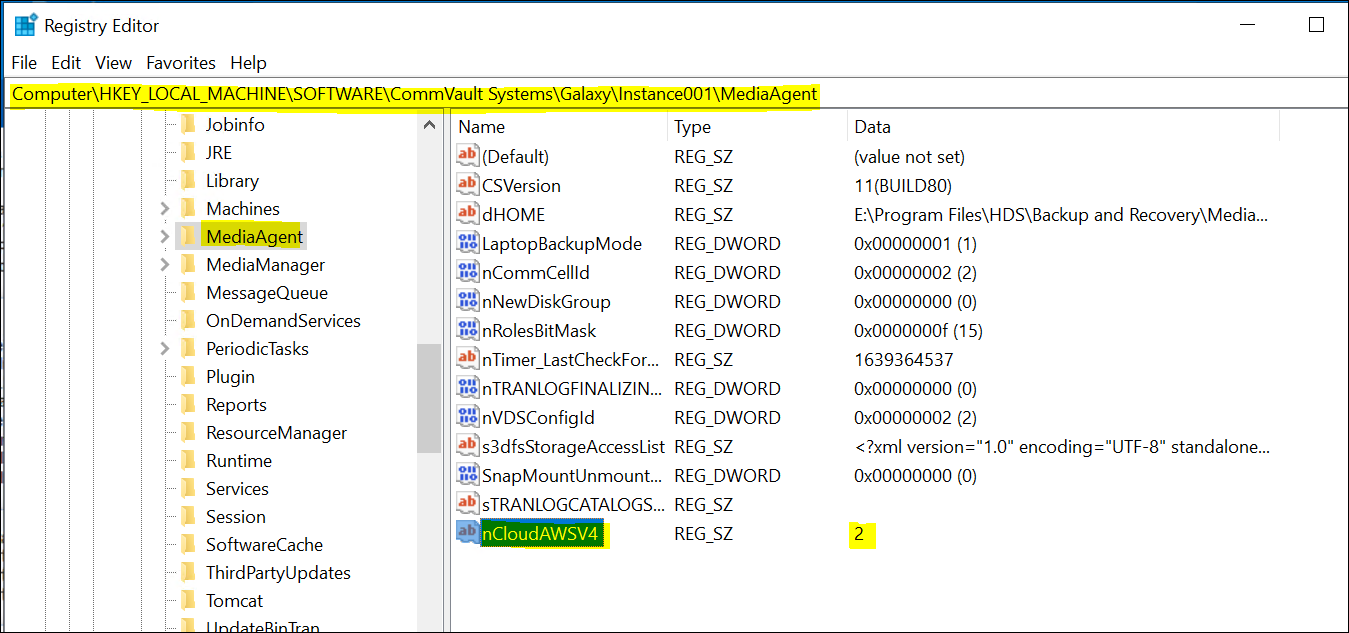
  2. One more case to  try , please set this Reg key  ncloudAWSV4  to  value  2  at HKEY_LOCAL_MACHINE\SOFTWARE\CommVault Systems\Galaxy\Instance001\MediaAgent  like below and rerun the  job and  let us know it worked or not . Please share the cloud Activity log for this also . 
  3.  


Forum|alt.badge.img+11
  • Author
  • Commvault Certified Expert
  • January 6, 2022

Hi! StorageGRID (extra logic on top of SANtricity) and FAS/AFF (ONTAP) are two completely different systems.

I tried with an extra reg key but it didn’t work. ONTAP S3 requires signatures v4.

I sent you log file as requested.

I really appreciate your help guys!


Forum|alt.badge.img+11
  • Author
  • Commvault Certified Expert
  • Answer
  • January 10, 2022

Update - the issue was resolved by installing the Diag2063 on MediaAgent. Big thanks to Karthik and the rest of you guys!