Solved

Azure Blob prefered tier for o365

  • February 2, 2024
  • 5 replies
  • 265 views

Nikos.Kyrm
Community All Star
Forum|alt.badge.img+17

Hello all,

Considering that currently Commvault basically supports only infinity retention for o365 backup services, what will be the preferred / cost optimized choice of blob tier? As Disk Storage in a Azure MediaAgent.

Hot, Cool or Cold?
 

Please for your feedback, thoughts!

Best regards,
Nikos

Best answer by John Robert

@Nikos.Kyrm From my understanding the performance is similiar. All three have milliseconds latency while archive has hours due to rehydration. Hot has 99.9% availability while cool and cold has 99%

You need to beware of the increased cost of writes and reads of cool. I have not looked at cold, but prices for write/read would be higher from here.

If you store and read 1 TB from cool, Total cost is the same pr month as store and read 1 TB from Hot.

Aux copies/sfulls and restores will increase read and data retrival costs.

Hot gives you predictable costs, while cold can give you varying costs (potentially higher than hot). I assume this is the main reason for recommending primary copy on hot tier. Not a technical limitation.


 

View original

5 replies

Forum|alt.badge.img+5

Hi Nikos,

Cool would probably be best here.

While you could save even more money with straight Cold, you would have to contend with longer restore times (due to recalling).


Forum|alt.badge.img+9
  • Vaulter
  • February 2, 2024

Hi @Nikos.Kyrm 


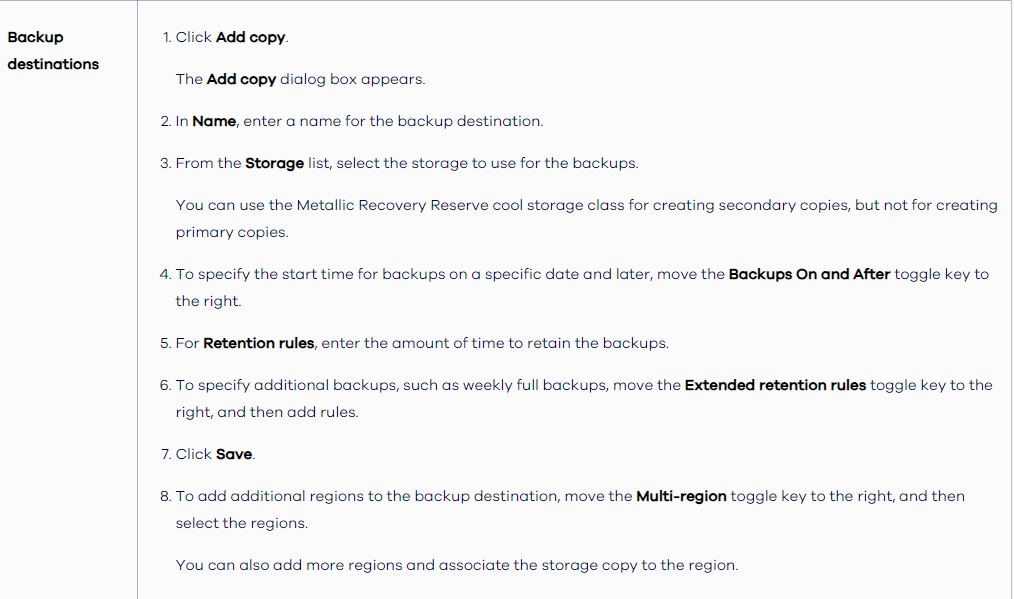
You can use cool storage for a secondary copy, but not for a primary copy:


https://documentation.commvault.com/2023e/essential/use_express_configuration_option_in_office_365_guided_setup_for_exchange_online.html


Damian Andre
Vaulter
Forum|alt.badge.img+27

Hi @Nikos.Kyrm 


You can use cool storage for a secondary copy, but not for a primary copy:


https://documentation.commvault.com/2023e/essential/use_express_configuration_option_in_office_365_guided_setup_for_exchange_online.html


I think this limitation only applies to Metallic Recovery Reserve / Air Gap protect rather than bringing your own storage.


Nikos.Kyrm
Community All Star
Forum|alt.badge.img+17
  • Author
  • Community All Star
  • February 5, 2024

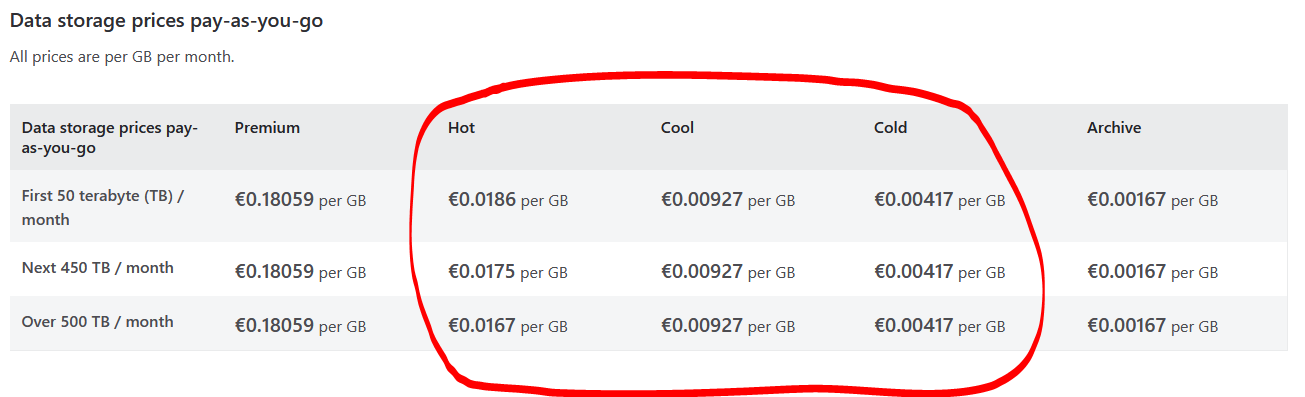
Here are the pay-as-you-go prices, also with cold tier:
 

https://azure.microsoft.com/en-us/pricing/details/storage/blobs/


So, except from minimum required days, is there any other differences between tiers? For example speed?


Hot tier - An online tier optimized for storing data that is accessed or modified frequently. The hot tier has the highest storage costs, but the lowest access costs.
Cool tier - An online tier optimized for storing data that is infrequently accessed or modified. Data in the cool tier should be stored for a minimum of 30 days. The cool tier has lower storage costs and higher access costs compared to the hot tier.
Cold tier - An online tier optimized for storing data that is rarely accessed or modified, but still requires fast retrieval. Data in the cold tier should be stored for a minimum of 90 days. The cold tier has lower storage costs and higher access costs compared to the cool tier.

https://learn.microsoft.com/en-us/azure/storage/blobs/access-tiers-overview


Forum|alt.badge.img+9

@Nikos.Kyrm From my understanding the performance is similiar. All three have milliseconds latency while archive has hours due to rehydration. Hot has 99.9% availability while cool and cold has 99%

You need to beware of the increased cost of writes and reads of cool. I have not looked at cold, but prices for write/read would be higher from here.

If you store and read 1 TB from cool, Total cost is the same pr month as store and read 1 TB from Hot.

Aux copies/sfulls and restores will increase read and data retrival costs.

Hot gives you predictable costs, while cold can give you varying costs (potentially higher than hot). I assume this is the main reason for recommending primary copy on hot tier. Not a technical limitation.