



Question

Commvault 11.40 - HPE Tape Auto Eject Issue During Backup

  • June 26, 2026
  • 1 reply
  • 13 views

Forum|alt.badge.img

Commvault Backup & Recovery 11.40 (Command Center - browser-based) when backing up a Windows file server to an HPE tape drive.

Environment:

  • Commvault Backup & Recovery 11.40
  • Browser-based Command Center
  • Backup target: HPE tape drive/library
  • Workload: File Server backup to tape

Issue:
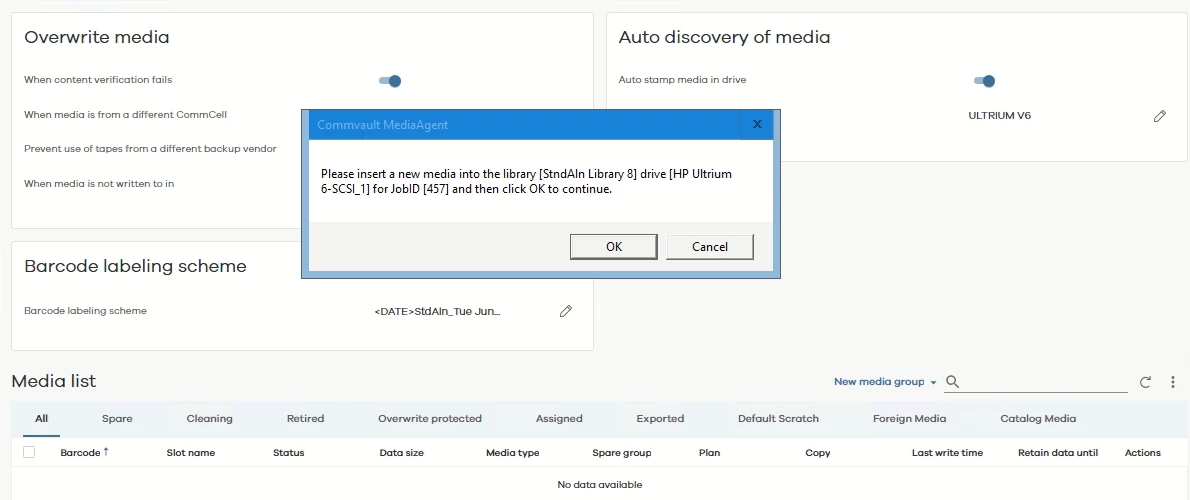
During or after the backup job, the HPE tape is automatically ejected. This does not happen every time, but it occurs frequently enough to interrupt our backup operations.

 

1 reply

Forum|alt.badge.img+2
  • Vaulter
  • June 28, 2026

Hello ​@Mon Myat  

Based on your screenshot and description, the Commvault Command Center is prompting for a new tape to be inserted during a backup job, and the HPE tape is being ejected automatically. This is a common scenario when the current tape is considered full, unusable, or not suitable for the job.


Possible Causes


  1. No Available Scratch Media
    • The tape library may not have any available scratch (blank or appendable) tapes, or the current tape is full or not appendable.
    • The message "Please insert a new media..." is typical when the job cannot continue writing to the current tape.
  2. Media Policy Settings
    • The "Overwrite media" settings or appendable window may be too restrictive, causing tapes to be marked as full or not eligible for reuse.
    • The "Start New Media" option may be enabled in the schedule policy, causing the system to request a new tape for each job.
  3. Barcode/Media Recognition Issues
    • If the tape barcode is not recognized or the tape is not cataloged correctly, Commvault may reject it and prompt for new media.
  4. Hardware/Drive Issues
    • If the drive encounters a read/write error or hardware fault, it may eject the tape and request a new one.

Next Steps

--> If no scratch media is available: Import new tapes or free up existing ones.

--> If appendable window is too short: Increase the window in the library properties.

--> If "Start New Media" is enabled: Disable it in the schedule policy.

--> If hardware issues are found: Address any drive or library errors before retrying the backup.

