Question

Error Code [13:245] and [30:378]

  • October 10, 2025
  • 8 replies
  • 119 views

Forum|alt.badge.img+5

i have a problem. i changed disks on my storage, i restored backups on new disks. my commvault i proceed that make backups on this storage library, but i receive error notifications 


  • Job Management - Auxiliary Copy  [Media read operation failure] [Dedupe disk media] [Operating System could not find the path specified.] [in media (CV_MAGNETIC) , Path (\\192.168.170.100\AMS_Backup\Commvault\9ITOLX_09.06.2022_10.40\CV_MAGNETIC\V_10282)]
  • Failed to generate collect file for backup contents [C:\Program Files\Commvault\ContentStore\iDataAgent\JobResults\CV_JobResults\2\0\537187\LogDBList.cvf] or the file size is zero. Possible reasons are 1. nonexistent path/file 2. disk is full or 3. incorrect permissions for the user configured at the instance level or 4. subclient contents are empty and/or Auto-Discovery not enabled.

i tested from windows explorer and cmd. i have access this share location on my storage library. What i do?


8 replies

Forum|alt.badge.img+8

Hi ​@gogi100 ,
 

Auxiliary copy jobs are failing with the error "Media read operation failure" and "Operating System could not find the path specified", pointing to a  disk media path. Although the storage share is accessible via Windows Explorer and CMD, Commvault is unable to read from the specified path during job execution.

Could you please check the below and let us know. Thank You!

1. Verify Disk Library Path Configuration: Ensure that the mount path \\192.168.170.100\AMS_Backup\Commvault\9ITOLX_09.06.2022_10.40\CV_MAGNETIC\V_10282 is correctly defined in the disk library settings. Confirm that the correct MediaAgent is assigned and has access to the mount path.

2. Check Mount Path Status in CommCell Console: Go to Storage Resources > Libraries. Right-click the relevant disk library > Properties > Mount Paths tab.

Make sure the mount path is Online. If not, try to re-enable or re-add it.

3. Validate Permissions: Confirm that the MediaAgent service account has full read/write and NTFS permissions on the shared folder. Ensure any credentials used in Commvault for the UNC path are correct and active.

4. Confirm Path Consistency: If storage disks or paths changed, Commvault might be referencing an outdated path. Double-check that the path configured in Commvault exactly matches the restored structure on the storage.

5. Restart Commvault Services on MediaAgent: Restarting services on the MediaAgent can help resolve mount path state inconsistencies.

6. Review Logs and Event Viewer: Examine Windows Event Viewer for any system or disk errors. Review Commvault logs like CVMA.log and cvjobreplicatorods.log on the MediaAgent for deeper insights.

Regards,
Dheeraj


Forum|alt.badge.img+5
  • Author
  • Byte
  • October 13, 2025

in the meantime I found that there is a problem between my tape drive and the storage library. on the server where the media agent is installed through which my tape drive accesses the storage \\192.168.170.100\AMS_Backup\Commvault\9ITOLX_09.06.2022_10.40\CV_MAGNETIC\ I can access it from windows explorer. I have a problem with the storage policy. I did Run Data Verification on my Hyper-V-sharepoint and SQL-server-plan. I ran Run Auxiliary Copy, I chose secondary copy and both copies went through but I got a message on one of the policies

@@@@@@@@@@@@@@@@@@@@@@@@@@@@@@@@@@@@@@@@@@@@@@@@@@@@@@@@@@@@ Machine : CommServe File : JobManager.log @@@@@@@@@@@@@@@@@@@@@@@@@@@@@@@@@@@@@@@@@@@@@@@@@@@@@@@@@@@@ 2376 4170 10/13 12:46:30 539230 Servant [---- IMMEDIATE AUXILIARY COPY REQUEST ----]. Task Id [3498] ArchGrp [SQL-server-plan] 2376 4170 10/13 12:46:30 539230 AMChunkReplicateHandler::populateToBeReplicatedArchFiles Some jobs [535761,535764,536839,536840,538304] have been skipped on copy [SQL-server-plan/SQL_On_Tape] since data verification failed on these jobs on source copy. 2376 583c 10/13 12:46:34 539230 JobSvr Obj There are no readers available. 2376 583c 10/13 12:46:34 539230 Scheduler -> COMPLETED <- JobType[Auxiliary Copy] CompletionStatus[Success] 2376 583c 10/13 12:46:34 539230 JMGUIReport2::sendJobCompleted Sent job completed message to GUI. 

I checked jobs 535761,535764,536839,536840,538304 in Job controller and they all completed successfully

I don't know what else to do.


Forum|alt.badge.img+5
  • Author
  • Byte
  • October 13, 2025

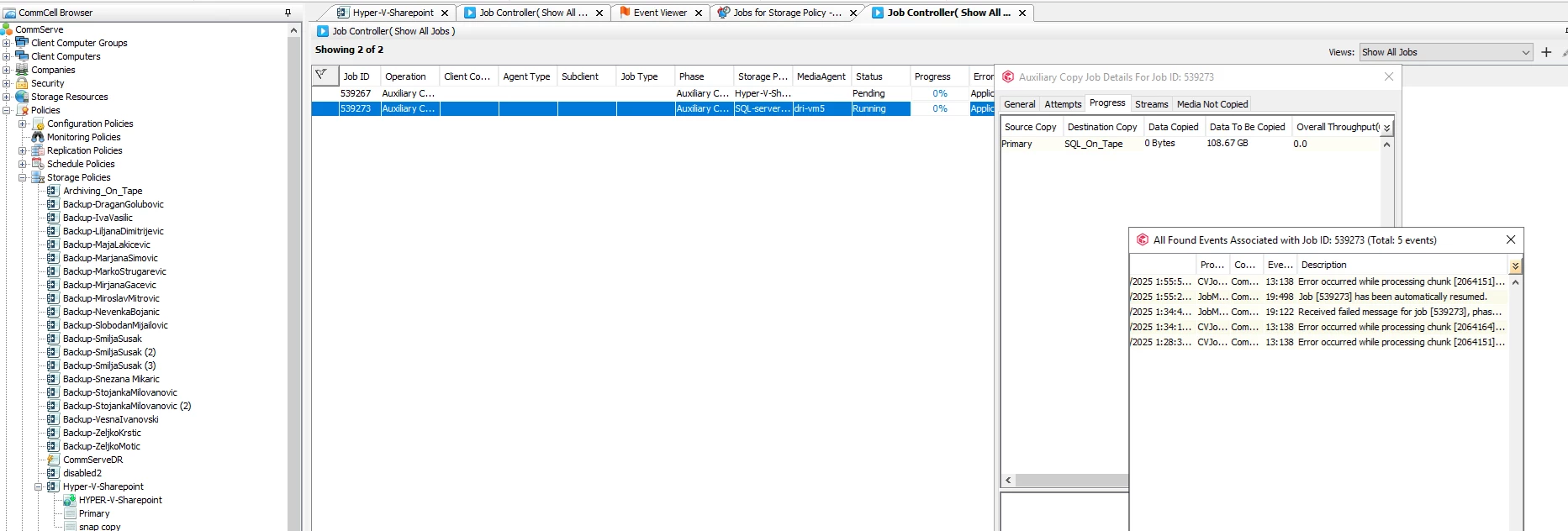
now, in job controller i receive


Forum|alt.badge.img+5
  • Author
  • Byte
  • October 13, 2025

my logs for this job, i attached on message


Forum|alt.badge.img+8

Hi ​@gogi100 ,
 

Below message indicates that while the backup jobs completed successfully on the source copy, they failed data verification. Because of this, the auxiliary copy process skipped these jobs and did not copy them to the secondary (tape) copy.

"Some jobs [535761, 535764, 536839, 536840, 538304] have been skipped on copy [SQL-server-plan/SQL_On_Tape] since data verification failed on these jobs on source copy."


Backup jobs may appear as “Completed”, but if the backup data becomes unreadable, missing, or corrupted, Commvault's data verification process will flag them as failed.

Jobs that fail verification are marked as "Bad" and are excluded from auxiliary copy to prevent copying incomplete or potentially corrupted data — this is an intentional safeguard to maintain data integrity.

- Check Data Verification Status : In commcell console -> Navigate to the storage policy copy for SQL-server-plan -> Locate the affected jobs and check the Data Verification Status column.
Jobs with a status of “Failed” are not eligible for auxiliary copy.

-  Identify the Cause of Failure : Common causes include Missing or deleted backup files, Inaccessible or offline mount paths, Disk issues or corruption, Permission errors

- Review the Job History or the Data Verification Job Summary Report for detailed error messages - Data Verification Job Summary Report Overview
- If the mount path or disk is now available and healthy, you may attempt to re-run data verification for these jobs on the Source copy from Storage Policy → Copy → View Jobs → Run Data Verification.
- If the verification still fails, the backup data is likely no longer usable.
- Run New Full Backups for the affected clients or subclients. to ensure data availability for future auxiliary copies.
- These new jobs will serve as valid recovery points for secondary copies.

Regards,
Dheeraj


Forum|alt.badge.img+8

Hi ​@gogi100,

Please review the Auxiliary Copy Troubleshooting. If still issue persist, would recommend opening a support case to investigate further. Thank You!!


Regards,

Dheeraj


Forum|alt.badge.img+5
  • Author
  • Byte
  • October 13, 2025

can you give me the link for the support case?


Forum|alt.badge.img+8

You can reach Commvault Support Team through the Support Portal : https://support.commvault.com/
 or by calling Commvault toll-free number: +1 877-780-3077.

For phone support details, visit: https://support.commvault.com/Support/TelephoneSupport

Regards,
Dheeraj