Answer

How to Estimate Storage Savings When Reducing Retention from 90 to 60 Days

  • July 30, 2025
  • 5 replies
  • 79 views

Forum|alt.badge.img+2

Hi everyone,

We're planning to reduce our retention policy from 90 to 60 days on a Commvault library and would like to estimate the potential space savings this change would provide.

We’re particularly interested in two scenarios:

  1. Adjusting the retention period on the entire library

  2. Adjusting it only for specific subclients

Has anyone done this before or know the best way to extract this information (e.g., using built-in reports, custom queries, or logs)? Any help, scripts, or suggestions would be appreciated.

I have seen some inconclusive posts in the community page, so I thought I’d ask.

We are on v11.32, and do not have the “Data Retention Report” which could provably help. Also was not able to come up with a way to get this information from the “Data Retention Forecast and Compliance Report.”

I guess a way would be adding up the first/oldest 30 days with of backups, but not sure whether this accounts for deduplication or not.


Thanks in advance!
Best answer by Ralph

Hi ​@SMDQ,

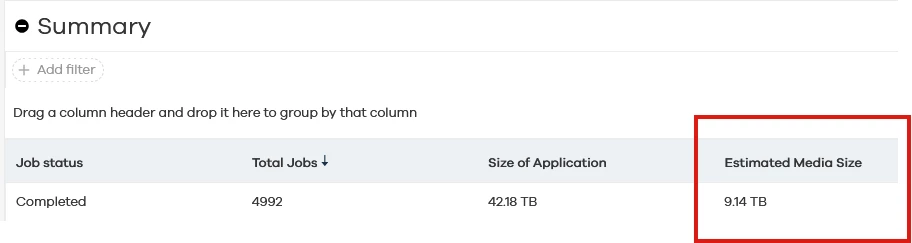
take a look at the Backup job summary report.

The Estimated Media Size x 30 days should give you an idea about the possible savings.


Thanks,

Ralph

5 replies

Scott Moseman
Vaulter
Forum|alt.badge.img+19

If the data is deduplicated, do not expect much space to be returned.

Thanks,
Scott


Forum|alt.badge.img+2
  • Author
  • Byte
  • July 30, 2025

Hi ​@Scott Moseman,

Yes, I’ve heard that too, even from Commvault techs working with me on cases. Also, that is most likely a guessing game to calculate what would that estimation be.

I wanted to check with the community to know what the experience has been for some of you in the same situation.


Cheers


Ralph
Vaulter
Forum|alt.badge.img+8
  • Vaulter
  • Answer
  • July 31, 2025

Hi ​@SMDQ,

take a look at the Backup job summary report.

The Estimated Media Size x 30 days should give you an idea about the possible savings.


Thanks,

Ralph


Forum|alt.badge.img+2
  • Author
  • Byte
  • July 31, 2025

Hi ​@Ralph,

Thank you very much for the info. I will give this a go.

Cheers,

SMDQ


Forum|alt.badge.img+2
  • Author
  • Byte
  • July 31, 2025

Hi all,

FYI I received this from Commvault Support, that might help the community out:

You can run data retention and forecast report for storage library or storage policy level and calculate the space each job is consuming who will get aged when you change the retention 


To run the report, you can follow below steps:

– Open commcell console → Reports 

– Click on other reports and select forecast report

– Apply filter for storage policies or library 

– Execute the report 


There is another way to calculate it 

– List the job from storage policy copy for which you would like to change the retention 

– Export the job in xml format 

– Calculate the data written for those jobs whose retention date will be old (which will probably mark for pruning) after changing the retention days 


You can calculate the data written size as it is actual data written on library after dedup


Regards,

SMDQ