



This is the fourth and final installment in our series of articles on the latest capabilities of HyperScale X. Catch up on the first three: what’s new in HyperScale X in 2022E, redesign and innovation of the HSX installer, and enterprise-grade security capabilities.
The latest release of Commvault HyperScale X 2022E brings continued focus and improvement on the day-to-day operational aspects of the product. Arguably, customers spend a majority of their time simply operating, upgrading, and ensuring the health of their data protection environments. While initial installation is important, the maintenance and monitoring aspects of the product are key to enable the business operations to continue with little or no impact.
After HyperScale X has been installed and secured, much of the ongoing efforts will be making sure that the software is kept up to date, and that any failures are rapidly detected, remediated, and brought back to service in a timely manner. These two items will be the primary focus of this final blog post in our series.
Upgrades
To begin, let’s cover recent changes to the Commvault product versioning. Beginning in March 2022, Commvault transitioned from a quarterly release cadence to bi-annual releases. This decision was made for a variety of reasons, including product stability and quality, as well as to ease any necessary testing and upgrade cycles within customer environments. As part of the bi-annual release process, two different types of releases will be made. The mid-year release will be designated as a Long Term Support (LTS) release, noted by the ‘E’ designator on the release numbering, and will have a support life of up to 3 years.
The end-of-year release will be a Platform Release (previously referred to as a Feature Release) and will have a support lifecycle of up to 1 year. Complete details on the updated release cadence may be found in our documentation. Maintenance releases will be made available on a monthly basis for one year for Platform Releases. LTS releases will have maintenance releases monthly for a minimum of two years, and on an as-needed basis during year three. A more in-depth explanation of dates and releases is available here.
In addition to the standard Commvault updates, HyperScale X has additional updates which must be managed and maintained. The HyperScale X platform updates include storage, operating system, and security related fixes and updates. HyperScale X platform updates follow an independent numbering scheme, separate from the Commvault versions. This separation allows customers to differentiate from the Commvault versioning and that of the underlying HyperScale X platform version. The release cadence of the HyperScale X platform updates, however, is the same as the associated Commvault versions. HyperScale X follows a [version].[release] nomenclature.
The [version] for HyperScale X will be denoted as ‘2’. The [release] is a 4-digit number noting the year and month of release (i.e. 2207 would note a July 2022 release). The specific versions of the RedHat OS version, kernel details, and Commvault Distributed Storage releases in each version may be found online.
It is highly recommended that customers regularly evaluate their versions of software being run, as well as security or fixes associated with a release, to determine applicability to an environment.
When upgrading an environment running Commvault HyperScale X, if an upgrade to the Commvault software is planned as well, it is best practice to ensure that the Commvault software is upgraded first. Otherwise, there are no direct dependencies between the HyperScale X software and Commvault software. To obtain the latest Commvault and HyperScale X software, schedule or run on demand the Download/copy software task from the Manage → System menu within Command Center, ensuring that the remote caches are selected for synchronization. After obtaining the software, follow the standard upgrade procedures to upgrade the Commvault software, before upgrading the Commvault Distributed Storage (CDS) or Operating System components of HyperScale X.
After downloading and applying any needed Commvault updates, connect to the console of the node containing the remote software cache within the HyperScale X cluster. To update the Hyperscale X platform version, updates may be applied during a maintenance window as outlined in the upgrades steps here. This process will bring down the cluster services and storage volumes, and reboot the nodes in the HyperScale X cluster, and should thus be performed during a maintenance window.
Ensure the updates are applied by logging into the remote cache node within the HyperScale X cluster from the KVM or IPMI console. Only after the HyperScale X platform updates are applied will the version in the HyperScale dashboard update; if any updates are not applied, the version number will remain as it was prior to upgrade. It is recommended best practice that all HyperScale X components be upgraded together, whenever feasible.
For systems with no internet connectivity, it is necessary to install updates using offline methods. Prior to Commvault 2022E, updates to HyperScale X required downloading a lengthy series of packages and manual transfer of all packages to one of the nodes that would serve as the software cache. This resulted in quite a lot of data to download and move around to the nodes. With the 2022E release, however, a more optimized method has been developed which minimizes the amount of data needed to be downloaded, and results in the creation of a customized appliance package.
The process is covered in detail here and minimizes the data required to only that relevant to the systems being updated. This will result in a more timely update, with less data transfer required. We look forward to feedback on the feature!
Monitioring
Hardware monitoring and alerting is one of the most anticipated, and customer impactful, improvements in HyperScale X 2.3. While hardware alerting has long been available with the Commvault Appliances, this functionality is now available for all supported Reference Architecture systems as well. The monitored hardware components include data and cache disks, power supplies, system fans, and network adapters. These alerts are supported, starting with the 2208 update, and are displayed within the HyperScale X Dashboard, and failure of a monitored component will result in an update to the dashboard and triggering of the relevant alert.
To ensure notification, it is recommended that both the “Dial Home for HyperScale and Appliance hardware” alert and the “Scale Out Disk Health” alerts be reviewed to ensure that the proper Alert Targets have been selected per the needs of each customer. While the admin user is automatically included, it may be desirable to enable the “master” group, operations staff, or add additional locations for the alert to be sent, such as the Console or Event Viewer.
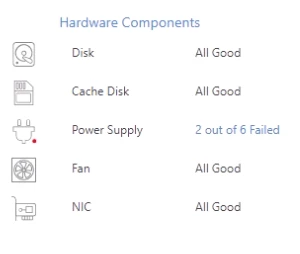
The “at a glance” view of the monitored hardware components on the HyperScale Dashboard provides a quick summary of the cluster health, thereby making it easy to know if all components are performing optimally. In the screen shot below, a rack PDU was undergoing maintenance, which was highlighted to the Commvault administrative staff.
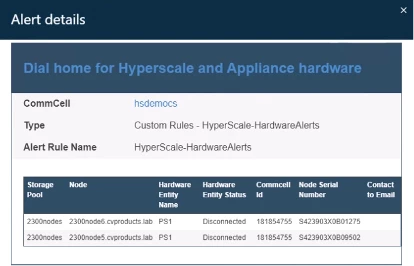
A more detailed HyperScale Hardware Report is available by clicking on the “Hardware Components” link within the HyperScale X Dashboard. On the report screen, a more detailed view of failed components is available, with options to filter and limit the report to specific nodes, as needed. Any Triggered Alert details may be accessed within the Alert Monitoring screen within Command Center. Clicking on details about an individual alert will provide granular information on the type of failure, and which node(s) are affected, as shown below.
Drive replacement is one of the most frequently performed hardware replacement tasks. As in any storage solution with a number of drives, both SSD and HDD, failures occur. Once an alert has been generated, diagnosed, and the appropriate hardware replacement performed, it’s important to not simply stop after the new drive has been plugged into the system. It’s vital that the Drive Replacement action be performed when the drive is back online. This informs HyperScale X that the failed hardware is back online, and available. This action is taken from the HyperScale X Storage screen within Command Center, as shown.

These improvements to the hardware monitoring bring the customer experience in line across either Commvault HyperScale X Appliances, or HyperScale X running on Reference Architecture systems. As platforms are added or updated to the list of supported Reference Architecture solutions, hardware monitoring will be part of the expected behavior for all HyperScale X systems.
Both Upgrade and Monitoring were improved with the goal of improving the customer experience. We look forward to hearing how these improvements are received by users of HyperScale X.
Through this, and the previous blogs, we hope you’ve gained a further understanding of the latest features and capabilities of HyperScale X. We look forward to hearing feedback on these improvements, as well as any additional questions pertaining to HyperScale X.