Question

After updating from SP28 to SP32, there is a change in communication - the MediaAgent hostname must be changed

  • October 31, 2025
  • 5 replies
  • 61 views

Hello Commvault Community, 


I've had a similar problem in other environments before, but I didn't investigate further.
 

Currently, after upgrading from SP28 to SP32, a communication problem occurred in one environment for an OLVM backup.
 

The logs show entries like these:
 

vsbkp.log

20252 4f1c 10/30 13:13:59 1413471 CVClient() - File[Client.cpp], Line[105] netHostName[ABC.XYZ.com]: Warning, deprecated call to lookup client using net hostname. Please use shortname instead
20252 4f1c 10/30 13:13:59 1413471 NetMessage::verifyResponseHeader() - Error Code [10485792] returned - [Error: AppLookupClientWithHostName errorCode[1] message[Unable to lookup client with hostname. Please check if CS has duplicate clients with hostname[ABC.XYZ.com].].
20252 4f1c 10/30 13:13:59 1413471 ClientInterfaceNet::lookup() - Error: AppLookupClientWithHostName errorCode[1] message[Unable to lookup client with hostname. Please check if CS has duplicate clients with hostname[ABC.XYZ.com].].
20252 4f1c 10/30 13:13:59 1413471 SENDCOMPDCHANGE sendDirChange: failed to get media agent version information for [ABC.XYZ.com]


After changing the "long" FQDN hostname to a "short" one, the problem stopped. I'm wondering what's causing this. Has something changed since SP32 and the "long" hostname isn't supported and must be a "short" hostname or an IP address?

It may be that in some environments, changing the hostname from a long name is impossible.


Thanks in advance!

Kind Regards,
Kamil

5 replies

Mohammed Ramadan
Forum|alt.badge.img+6

Hi ​@Kamil 

Hope you’re doing well

I’m glad to hear you were able to fix the issue and thank you for sharing the details.

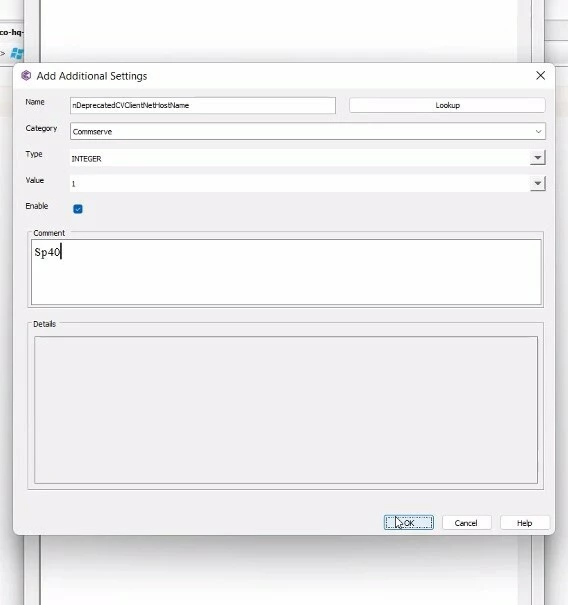
This problem isn’t related to SP32 we’ve seen the same issue before for one of our customers after upgrading to version 11.40 all clients showed the same error and we resolved it by adding an additional setting called “nDeprecatedCVClientNetHostName” to CS

I’ll share this here in case you or anyone else runs into the same issue in the future.

Thanks again for bringing up this topic

Best Regards,
Mohammed Ramadan
Data Protection Engineer


  • Author
  • October 31, 2025

Hi ​@Mohammed Ramadan 
 

Great news!
 

Thank you for this information. As I understand it, it doesn't have a version limit, but is there a description of what it does and what additional details should be set?
 

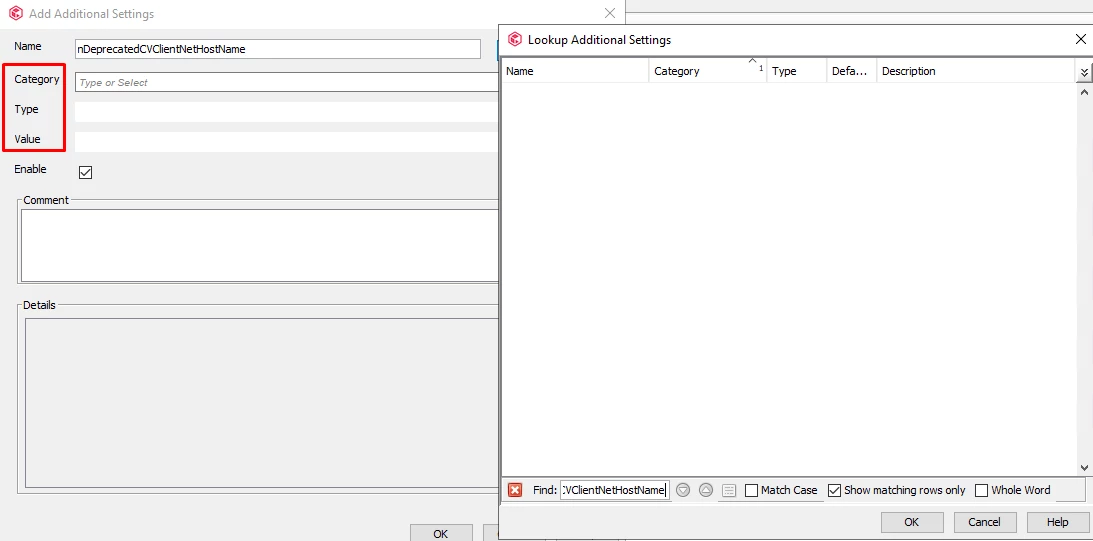
I don't see it on the Additional Settings portal, in the documentation, or in the key finder. The remaining values ​​should be specified as in the screenshot below.


Thanks for help!

KindRegards,
Kamil


Mohammed Ramadan
Forum|alt.badge.img+6

Hi ​@Kamil 

Please find attached the screenshot showing the configuration and details you mentioned.


Let me know if you need any further clarification or if there’s anything else you’d like me to check.

Best Regards,
Mohammed Ramadan
Data Protection Engineer


  • Author
  • October 31, 2025


Could you provide a description of this key? What does entering it do, and in what scenarios can it be safely used?

Customers expect such descriptions because they fear they might have undesirable consequences.


Mohammed Ramadan
Forum|alt.badge.img+6


Could you provide a description of this key? What does entering it do, and in what scenarios can it be safely used?

Customers expect such descriptions because they fear they might have undesirable consequences.

I think it’s best to open a support case for this