



Question

Proxmox VM Snapshot Consumes Storage Equal to VM Size During Commvault Backup

  • July 24, 2026
  • 1 reply
  • 37 views

Forum|alt.badge.img+3

Hi Commvault Community,

We are backing up Proxmox Virtual Machines using Commvault.

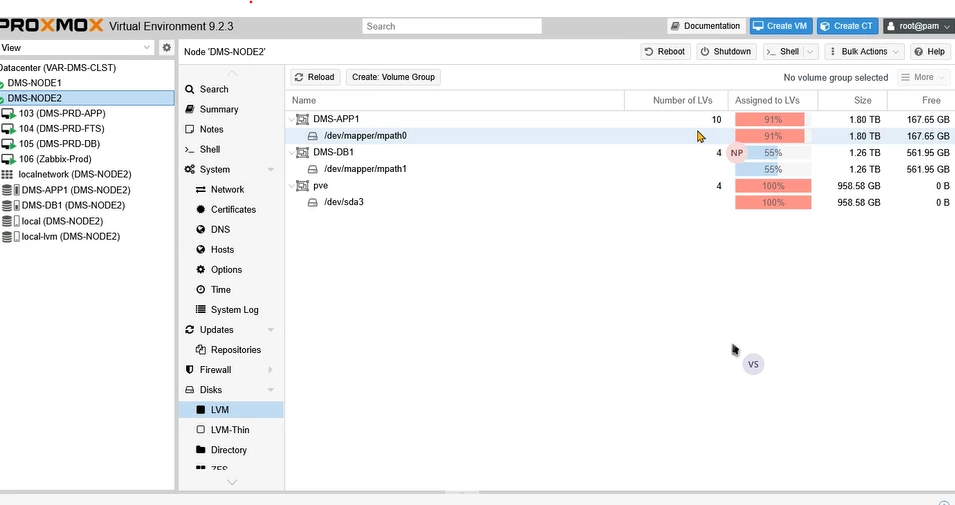
During the backup process, we observe that a snapshot is created on the Proxmox VM storage. The snapshot appears to consume storage space approximately equal to the VM disk size.

For example:

  • VM Disk Size: [300 GB]
  • Proxmox Storage Type: [LVM-thin / ZFS / Ceph / NFS / iSCSI / Other]
  • Commvault Access Node: Physical Server 
  • Backup Type: Full / Incremental
  • Storage Backend: [SAN/NAS/Local Storage]

During the Commvault backup, the Proxmox snapshot is created on the same storage where the VM disk resides. We would like to understand:

  1. Is it expected behavior for the Proxmox snapshot created during a Commvault backup to consume storage close to the provisioned VM disk size?
  2. Does Commvault use a standard Proxmox snapshot or another snapshot mechanism?
  3. Is there a way to configure the snapshot to use a different storage location?
  4. Does Commvault support storage-level snapshots for Proxmox?
  5. What is the recommended configuration to avoid production storage consumption during backup?

We would appreciate any documentation or recommended best practices for Proxmox VM backup using Commvault.



1 reply

Forum|alt.badge.img+2
  • Vaulter
  • July 26, 2026

Hi ​@Vishal Saini  


Please find the below repsonse, 


1. Is it expected behavior for the Proxmox snapshot created during a Commvault backup to consume storage close to the provisioned VM disk size?

Not always. Expected behavior depends on snapshot type:

- LVM COW snapshots: Commvault/Proxmox create COW-style snapshots (default LVM snapshot size can be small — e.g., docs reference a 4 GB default for LVM snapshots used by IntelliSnap — but they grow as source data changes). Monitor snapshot space; if the change rate exceeds the snapshot reservation it can grow or fail.
- If you see a snapshot occupying near the full VM provisioned size, verify whether Proxmox or the array is creating a full clone or a snapshot type that pre-allocates space; check disk format and storage driver behavior.

2. Does Commvault use a standard Proxmox snapshot or another snapshot mechanism?

- For Proxmox thick LVM on Proxmox VE 9.0+ with QCOW2 and the "Allow Snapshots as Volume Chain" option enabled, Commvault supports native Proxmox/native snapshots.
- For other Proxmox configurations (for example RAW disks on older Proxmox VE), Commvault uses QEMU/QEMU staging snapshot methods (requires a configured staging directory).

3. Is there a way to configure the snapshot to use a different storage location?

- QEMU snapshot staging directory: when QEMU/RAW-style snapshots are used (Proxmox VE 8.x/9.x RAW workflows), you must configure a QEMU snapshot staging directory in the VM group. - That staging directory can be local storage or a mounted share (NFS/SMB) accessible to the access node — so you can place staging/snapshot I/O off the production datastore.

- Go to Protect > Virtual machines.
- Open the VM group for the VMs you back up.
- On the Configuration tab, in the Settings tile, click the edit icon for the snapshot staging directory.
- Enter the staging directory path, enable it, and click Save.

4. Does Commvault support storage-level snapshots for Proxmox?

Commvault supports native snapshots for thick LVM when VM disk format is QCOW2 and the Proxmox "Allow Snapshots as Volume Chain" option is enabled (Proxmox VE 9.0+).

https://documentation.commvault.com/11.44/software/backups_for_proxmox_vms.html#backups-for-thick-lvm-storage

5. What is the recommended configuration to avoid production storage consumption during backup?

- For Proxmox thick LVM use QCOW2 + enable "Allow Snapshots as Volume Chain" on Proxmox VE 9.0+ to use native snapshots where supported.
- If you must use QEMU/LVM RAW snapshots (older versions or RAW disks), configure the QEMU snapshot staging directory in the VM group on separate storage (local or a mounted NFS/SMB) so temporary snapshot data does not consume the production datastore.
- Do NOT enable "Allow snapshots as volume-chain" on NFS datastores (that option is not applicable to NFS and can cause failures).
- Monitor snapshot space proactively and group volumes by rate of change (best-practice guidance for arrays) so snapshot growth is predictable.
 

Regards,

Kalaivanan.

