Answer

Restore Virtual Access Node

  • November 27, 2024
  • 4 replies
  • 47 views

Forum|alt.badge.img+1

Hi All,

Is there any way I can restore full virtual machine to a virtual access node if it is only access node in particular VMware environment. Because all Commvault services on this access node don’t start up after upgrading its software version to 11.32.69. 


Thank you.

Best answer by Rajiv

Hello ​@Andy Nguyen Can you check for space on /opt by running df -kh and make sure you have enough space? Push update had failed I believe, and this would need repair/re-installation of commvault software on this client. 

4 replies

Rajiv
Vaulter
Forum|alt.badge.img+12
  • Vaulter
  • November 27, 2024

Hello ​@Andy Nguyen Did the upgrade completed successfully and asked for a reboot to complete the install? Also, the Auto-start services when OS starts option in process manager under services, checked? 

Best,

Rajiv Singal


Forum|alt.badge.img+1
  • Author
  • Bit
  • November 28, 2024

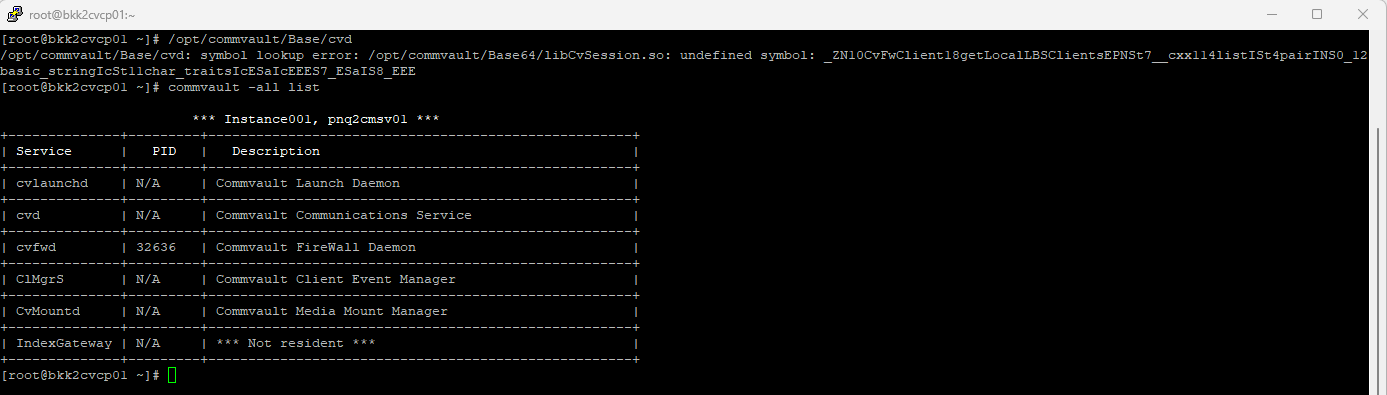
Hi Rajiv, I did the upgrade using CommServe server not locally on the VSA proxy node. From Job Control screen it states upgrade “Failed” because no response from client. When login to VSA node, I see only cvdfw service is running, the rest is stopped (this is Linux client not Windows) even after reboot. Manually starting cvd service then I got below error:


Rajiv
Vaulter
Forum|alt.badge.img+12
  • Vaulter
  • Answer
  • November 28, 2024

Hello ​@Andy Nguyen Can you check for space on /opt by running df -kh and make sure you have enough space? Push update had failed I believe, and this would need repair/re-installation of commvault software on this client. 


Forum|alt.badge.img+1
  • Author
  • Bit
  • December 2, 2024

Thanks Rajiv, it has been fixed by manually re-install the package.