Answer

Unable to delete Schedule Policy

  • October 4, 2021
  • 13 replies
  • 837 views

antonio
Novice
Forum|alt.badge.img+7

Hello guys, I’m trying to delete/remove a Schedule Policy under a Subclient, but the option for removing, is not enabled:
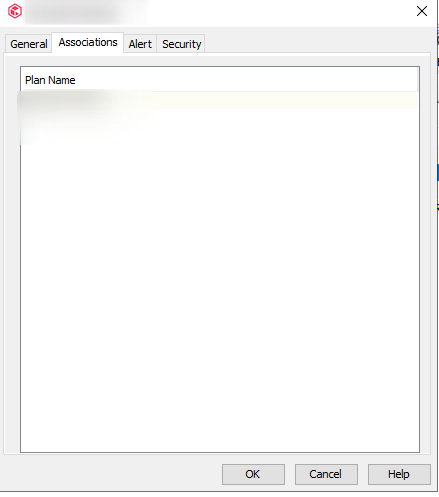
I try to run a Decouple, but I received this message:

I need to remove the Schedules so the VSAppware can run with no problems. I think that I’m doing something wrong, but I can’t figure it out what it is, :grimacing: .

Best answer by dude

So there is a client there. Try going to that client, right click and view schedules. From there, try to remove the client from the schedule.

Otherwise in Command Center follow this (Step 7)

https://documentation.commvault.com/11.24/essential/87461_modifying_server_plan.html

13 replies

dude
Community All Star
Forum|alt.badge.img+15
  • Community All Star
  • October 4, 2021

Click at the CommServe Level at the top and View Schedules. Look for the specific sched and try again.


antonio
Novice
Forum|alt.badge.img+7
  • Author
  • Novice
  • October 4, 2021

Click at the CommServe Level at the top and View Schedules. Look for the specific sched and try again.

Hello dude, I tried to follow what you told, but still the same, :confounded:


dude
Community All Star
Forum|alt.badge.img+15
  • Community All Star
  • October 4, 2021

Click at the CommServe Level at the top and View Schedules. Look for the specific sched and try again.

Hello dude, I tried to follow what you told, but still the same, :confounded:

It looks like you are not masteradmin which would give you access to the schedule policy and delete it. 

Take ownership of that sched policy by running the following


qoperation execscript -sn ChangeScheduleOwner -si admin -si Domain\YOURUSER -si "schedulename"

Then you should be able to delete it.

https://documentation.commvault.com/11.24/expert/125933_transferring_schedule_policy_ownership_using_changescheduleowner_script.html


antonio
Novice
Forum|alt.badge.img+7
  • Author
  • Novice
  • October 4, 2021

Click at the CommServe Level at the top and View Schedules. Look for the specific sched and try again.

Hello dude, I tried to follow what you told, but still the same, :confounded:

It looks like you are not masteradmin which would give you access to the schedule policy and delete it. 

Take ownership of that sched policy by running the following


qoperation execscript -sn ChangeScheduleOwner -si admin -si Domain\YOURUSER -si "schedulename"

Then you should be able to delete it.

https://documentation.commvault.com/11.24/expert/125933_transferring_schedule_policy_ownership_using_changescheduleowner_script.html


Hello @dude, thanks for the help, :grinning: .

I ran the command as you told and besides I received the message “Qscript Execution Succeeded!” I closed the Console Commcell, and reopened but I still can’t delete the Schedules. (Just to inform: This Commcell, has been updated from 11.21 to 11.24, I don’t know if there’s something that can impact).


dude
Community All Star
Forum|alt.badge.img+15
  • Community All Star
  • October 4, 2021

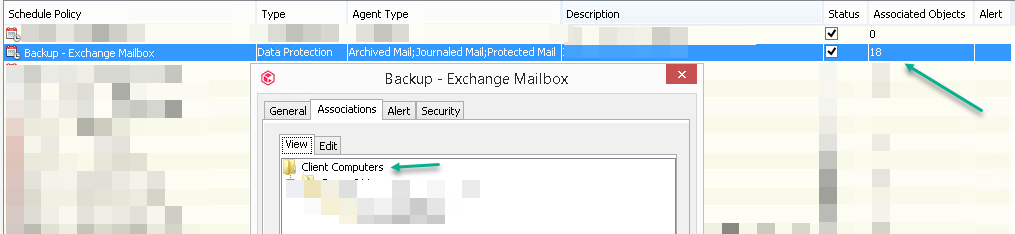
When you right click on the schedule policy → right click→ edit → Associattions tab → View tab. Do you see clients there? If so, to to the Edit tab and uncheck those clients. The schedule policy should show 0 clients associated to the schedule policy. In my example it shows 18 but the one above shows 0.


antonio
Novice
Forum|alt.badge.img+7
  • Author
  • Novice
  • October 4, 2021

When you right click on the schedule policy → right click→ edit → Associattions tab → View tab. Do you see clients there? If so, to to the Edit tab and uncheck those clients. The schedule policy should show 0 clients associated to the schedule policy. In my example it shows 18 but the one above shows 0.


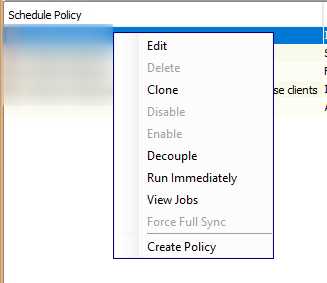
When I right click in the Schedule, he shows me this:

I remember that in the 11.21 version, this option it was like the screenshot you posted, but now it is different.


dude
Community All Star
Forum|alt.badge.img+15
  • Community All Star
  • October 4, 2021

Are you admin of this environment?


dude
Community All Star
Forum|alt.badge.img+15
  • Community All Star
  • Answer
  • October 4, 2021

So there is a client there. Try going to that client, right click and view schedules. From there, try to remove the client from the schedule.

Otherwise in Command Center follow this (Step 7)

https://documentation.commvault.com/11.24/essential/87461_modifying_server_plan.html


antonio
Novice
Forum|alt.badge.img+7
  • Author
  • Novice
  • October 4, 2021

Are you admin of this environment?

I am admin of the Commcell environment only.


antonio
Novice
Forum|alt.badge.img+7
  • Author
  • Novice
  • October 4, 2021

So there is a client there. Try going to that client, right click and view schedules. From there, try to remove the client from the schedule.

Otherwise in Command Center follow this (Step 7)

https://documentation.commvault.com/11.24/essential/87461_modifying_server_plan.html

I will follow this steps and see how it behaves, :blush:


antonio
Novice
Forum|alt.badge.img+7
  • Author
  • Novice
  • October 4, 2021

So there is a client there. Try going to that client, right click and view schedules. From there, try to remove the client from the schedule.

Otherwise in Command Center follow this (Step 7)

https://documentation.commvault.com/11.24/essential/87461_modifying_server_plan.html


@dude  thank you very much for the help, I followed the Step as you told and I could delete the Schedules, :smile: . You saved me, :grin:


dude
Community All Star
Forum|alt.badge.img+15
  • Community All Star
  • October 4, 2021

So there is a client there. Try going to that client, right click and view schedules. From there, try to remove the client from the schedule.

Otherwise in Command Center follow this (Step 7)

https://documentation.commvault.com/11.24/essential/87461_modifying_server_plan.html


@dude  thank you very much for the help, I followed the Step as you told and I could delete the Schedules, :smile: . You saved me, :grin:

Glad it worked.


Mike Struening
Vaulter
Forum|alt.badge.img+22

@dude is an absolute legend.