


Question

Virtual Machine Status at 90%

  • April 28, 2025
  • 1 reply
  • 28 views

Forum|alt.badge.img+4

11.36.52


I have had my VM backup performance drop off the cliff in the last week, trying to figure out some bits and pieces

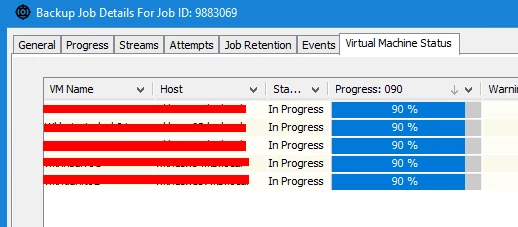
One thing I see in the ‘Backup Job Details’ is the many VMs at 90%

What is the actual status at this point?

They seem to be here for a long time, so any thoughts would be appreciated


Thanks

1 reply

Forum|alt.badge.img+8
  • Vaulter
  • April 29, 2025

Hi jracjdb2,

At 90% it’s usually reading the final few extents of a VM. You should be able to track exactly what is happening in vsbkp.log on the access node for the VM. I have previously seen VMs get stuck at 90% due to read issues or VDDK deadlocks.

I’d suggest checking the logs and see what events are being reported.

If you want general troubleshooting ideas you can also try a storage vMotion from the source datastore to another and then back to the source. It’s an odd suggestion but this can often resolve read request issues.

If it’s a VDDK deadlock occurring you may want to look at which VDDK is being used and the transport mode but that may need a support incident to investigate properly.

