




Answer

VM backup order / sequence

  • July 28, 2022
  • 3 replies
  • 432 views

Forum|alt.badge.img+5

Hi,

I need to backup virtual machines in specific order (this is VMware streaming backup with application-aware Active Directory). Is any possibility to do that, except creating subclient and schedule for every single VM?

For now I have multiple VMs in one subclient. I think I can set 1 data reader in that subclient and Commvault will backup in some sequence, but how to set this sequence? Because I don’t know if Commvault choose VM to backup randomly or in alphabetical order maybe?

Commvault 11.24

Regards
Best answer by Scott Moseman

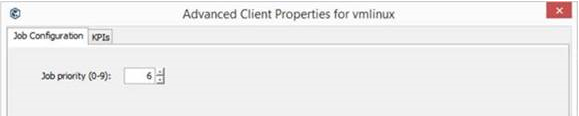
Depending on how many VMs are in your Subclient, you could assign Job Priorities.  Between 1 Data Reader and Job Priorities you should be able to get them to backup in order.

However I think the job priorities only go 0-9 so you’ll be limited to 10 VMs in this method.  I don’t believe I have heard of any other approach short of careful scheduling of the subclients.


Thanks,
Scott
 

3 replies

Onno van den Berg
Community All Star
Forum|alt.badge.img+22

Use different subclients/vm groups with differentiating schedules/plans or in case it is vm-centric (indexv2) leverage a script that triggers a VM-level/instance backup.  


Aplynx
Vaulter
Forum|alt.badge.img+12
  • Vaulter
  • July 28, 2022

Scott Moseman
Vaulter
Forum|alt.badge.img+18

Depending on how many VMs are in your Subclient, you could assign Job Priorities.  Between 1 Data Reader and Job Priorities you should be able to get them to backup in order.

However I think the job priorities only go 0-9 so you’ll be limited to 10 VMs in this method.  I don’t believe I have heard of any other approach short of careful scheduling of the subclients.


Thanks,
Scott





