


Answer

VMware missing restore option

  • November 5, 2021
  • 7 replies
  • 328 views

Forum|alt.badge.img+6

Hi,

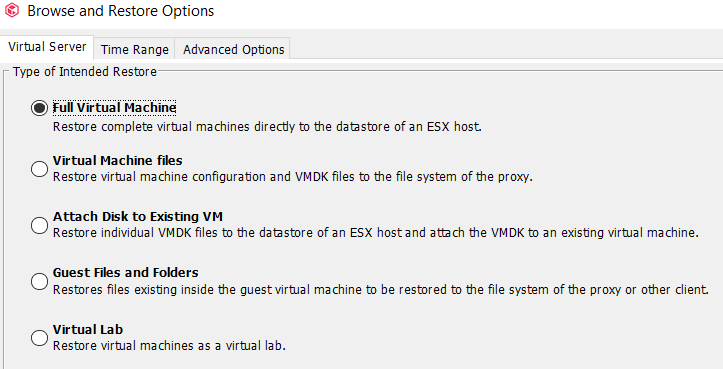
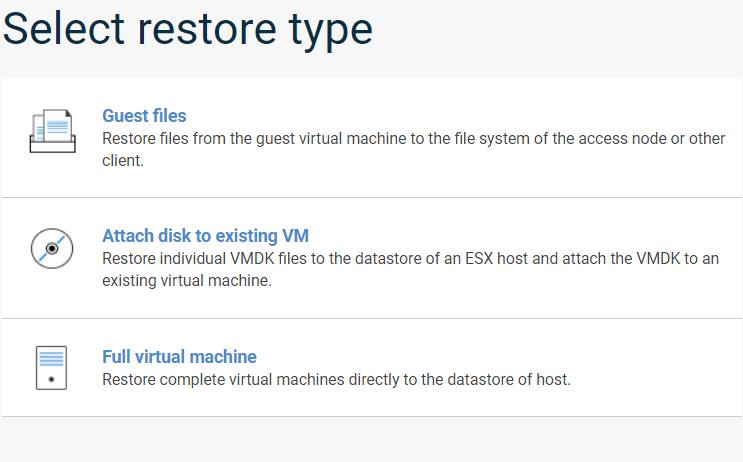
In the Command Center, unlike the Commcell Console, there are not all types of restore.
Obviously I log in on both consoles with the same company and the same user.
 

Best answer by Gabriele Palumbo

@Mike Struening

To solve the problem I had to add permissions on the access node at the client level and not at the instance level.
 

Thanks

7 replies

Mike Struening
Vaulter
Forum|alt.badge.img+22

Can you check these instructions and see if you see the option for Restoring virtual machine disk files?  I assumed VMWare, so let me know if it’s another hypervisor:

https://documentation.commvault.com/11.24/essential/121184_restoring_virtual_machine_disk_files_for_vmware.html


Forum|alt.badge.img+1

The other Restore Options in Command Center ONLY show on single VM Rowse (using the Virtual Machine Tab, if you browse from a VM group it will only show the limited view, additionally the Command Center View knows if the VM in question’s subclient and backup type allow for LiveMount/LiveRecovery/Virtual Lab and are configured , it will not show them if the FREL and VM Policy for the Lab do not exist.

However once you select one VM for restore in Command Center (when doing full machine) at the bottom of the restore the Live Mount/recovery options show if you select the power on options. 


Forum|alt.badge.img+6

Hi,

The restore option I need is “Virtual Machine Files”.
@Mike Struening  Yes the Hypervisor is VMware and I have already checked the documentation you speak of.
I don't think it's a roles problem because as I told you if I log into the commcell console with the same user / role I see correctly all the restore options including  “Virtual Machine Files”.

Thanks


Mike Struening
Vaulter
Forum|alt.badge.img+22

@Gabriele Palumbo , did you see the note from @Phil Schleper - CV ?


Forum|alt.badge.img+1

Also note that depending on privacy slider and the actual security for that user’s Role on that specific VMgroup (subclient);  the CommandCenter will hide the option even though the JAVA wont (java will show the option for example not the allow it to actually restore) however if it is still missing and the user has all Client Rights in security (for example Browse and Live Browse are ones that can hide some restore options) , if for some reason its not that please open up a case as it might be something else and support can see if there are any reported errors in the logs., but I notice you mentioned “company” in a multitenant environment the Tenant Operator roles have heavy restrictions


Forum|alt.badge.img+6

@Mike Struening

To solve the problem I had to add permissions on the access node at the client level and not at the instance level.
 

Thanks


Mike Struening
Vaulter
Forum|alt.badge.img+22

Glad to hear it!


