


Answer

O365 Sharepoint Online First Time Setup - Error is: The remote server returned an error: (401) Unauthorized.

  • December 2, 2024
  • 1 reply
  • 105 views

Forum|alt.badge.img+5

11.28.126
 

O365 Sharepoint Online First Time Setup - Error is: The remote server returned an error: (401) Unauthorized.

This appears in the CVSPAutoDiscoverScan.log on the O365 ‘Access Node’


We have setup a new Azure App, to backup Sharepoint Online for a customer, the Azure App appears as Authorized


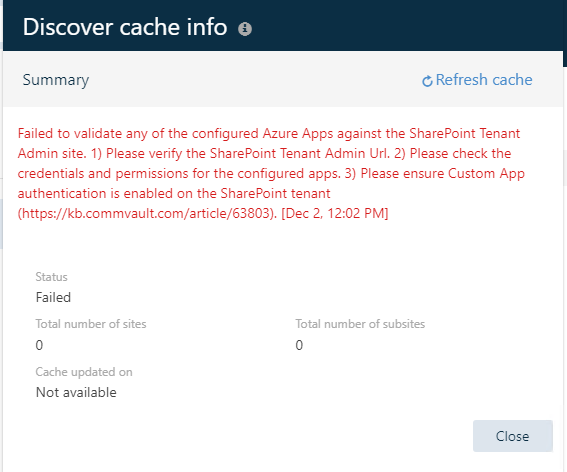
But we unable to get any Content, when I try ‘Add Sites’, we receive the following message - now my Azure guys tell me 1 and 2 are fine, so we go to three - the kb article refers to this command


Set-SPOTenant -DisableCustomAppAuthentication $false

Which my Azure guys tell me is now retired

I’m hoping someone has had this pain before and knows a workaround

Thanks
 

Best answer by Syed_S

Hi ​@jracjdb2 ,


SharePoint site discovery is getting failed with the below error:
Failed to validate any of the configured Azure Apps against the SharePoint Tenant Admin site

There could be two causes for this error:

SharePoint App principal failed/Not updated
SharePoint Auto-discovery did not run after changes to App

Resolution
Create app principal for the Azure app.

Refer
https://documentation.commvault.com/2024/essential/create_app_principal_for_sharepoint_online.html


Confirm that the sites are discovered, and it is displayed in the Add content.

1 reply

Forum|alt.badge.img+5
  • Vaulter
  • Answer
  • December 3, 2024

Hi ​@jracjdb2 ,


SharePoint site discovery is getting failed with the below error:
Failed to validate any of the configured Azure Apps against the SharePoint Tenant Admin site

There could be two causes for this error:

SharePoint App principal failed/Not updated
SharePoint Auto-discovery did not run after changes to App

Resolution
Create app principal for the Azure app.

Refer
https://documentation.commvault.com/2024/essential/create_app_principal_for_sharepoint_online.html


Confirm that the sites are discovered, and it is displayed in the Add content.


