



This is the first post in a four-part Community series on Commvault Auto Recovery capabilities.
Recovery of applications is a mandatory process for all organizations, regardless of their size or business type, due to the need for highly available service offerings, minimal loss recovery requirements, and support for global distributed infrastructure. The Covid-19 pandemic has further highlighted the importance of having a recovery strategy as organizations face unprecedented challenges in ensuring business continuity. Recovery solutions enables organizations to recover quickly and fully automated from cyber-attacks, disasters, and outages, but IT teams face unique challenges in testing recovery due to the complexity of these solutions and their specific business needs.
Commvault Auto Recovery provides a scalable and easy-to-use solution for recovering applications. A typical recovery plan may include several components, such as replication, storage, retention, RPOs, RTOs, and automation of operations like failover, failback, recovery tests, and analysis. These components are critical in ensuring an organization can quickly recover from a cyber-attack or a disaster and resume normal operations.
Challenges with Application Recovery
Increased frequency and sophistication of cyber-attacks:
There is an increase in the number of organizations that are getting affected with ransomware attacks throughout the world. The cost incurred by these organizations due to ransomware or other cyber attacks is also increasing exponentially as you can see in the below chart.

Reference: Ransomware Facts, Trends & Statistics for 2023 (safetydetectives.com)
To protect against potential cyber-attacks, it is crucial to secure data and workloads with end-to-end encryption, both at rest and in transit, ensuring that data remains confidential and inaccessible to unauthorized parties. Anomaly detection and reporting mechanisms should also be implemented to detect potential threats early and allow proactive measures to be taken.
In addition, regularly scanning replicas at the disaster recovery site to verify that data is not compromised will help ensure that only clean data is recovered. By implementing these measures, businesses can better safeguard their data and workloads against the constantly evolving threat landscape, maintaining the integrity and security of their systems.
Commvault Auto Recovery’s comprehensive approach to ransomware protection and recovery ensures that your data is safeguarded against potential cyber threats. The platform offers a layered approach to security that allows you to identify, assess, and mitigate risks while hardening against any changes that may occur.
In addition to these measures, Commvault Auto Recovery provides integrations with anomaly detection and reporting tools that help detect any unusual behavior in your data landscape. The platform also provides end-to-end encryption of data at-rest and in-flight, ensuring that your data is secure from potential breaches.
To further ensure data integrity, Commvault platform's file-type anomaly detection framework is a unique feature that allows it to identify when newly protected files have been corrupted, encrypted, or contain malicious applications that may be pretending to be "safe" files. This feature helps organizations respond quickly to potential threats and automatically recover clean, unaffected versions of those files.
As cyber threats continue to evolve, Commvault Auto Recovery stays vigilant in providing ongoing updates and enhancements to its security features. The platform is continually updated with new tools to offer greater vigilance and resiliency against these advanced threats. With Commvault Auto Recovery, you can be confident that your data is secure and that you can recover quickly in the event of a ransomware attack.
Aggressive RPOs and RTOs:
A tailored data protection and recovery solution is necessary to meet specific recovery objectives and avoid overspending on storage or unnecessary resource allocation. It should be capable of adapting to changing data needs by automatically adjusting storage capacity and providing failover and failback capabilities. This ensures that data and workloads can be quickly recovered with minimal business disruption, preventing costly downtime, and reducing the impact of unexpected events such as hardware failures or natural disasters.
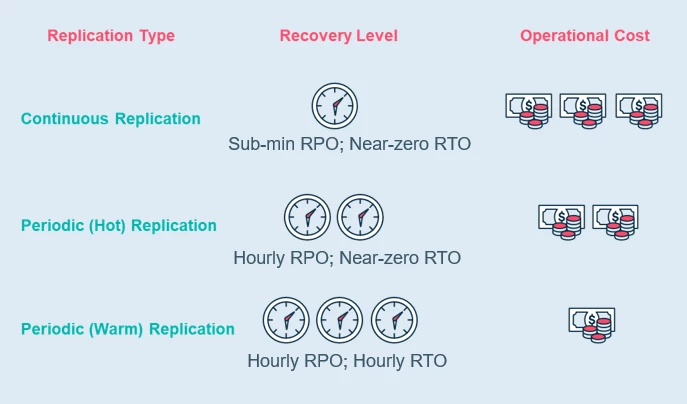
Commvault Auto Recovery provides various options for protecting and recovering your data and workloads based on their mission criticality. For VMware workloads, you can choose from periodic (warm), periodic (hot), or continuous replication to achieve different levels of recovery point objective (RPO) and recovery time objective (RTO). Continuous replication using VMware VAIO is recommended for an RPO of less than 15 minutes. For other workloads, periodic replication with different platforms such as VMware, Hyper-V, Azure, AWS, and GCP can achieve an RPO of hourly granularity. The choice between hot and warm site solutions depends on your RTO requirements. Commvault Auto Recovery offers flexibility and customization to help you protect your data and workloads efficiently and cost-effectively.
Complexity in Managing Recovery Infrastructure and Orchestration
Managing recovery infrastructure and orchestration can be a complex task, especially when dealing with various types of workloads and data that are offsite or in the cloud. It can be even more challenging when each workload or data type requires a different user interface. This can lead to inefficiencies, errors, and delays.
Commvault Auto Recovery offers a simplified and streamlined approach to recovering data at scale. With its single interface, it allows for easy management of backup and DR needs across different environments, such as on-premises, multi-cloud, and hybrid. Its extensive API library enables a seamless connection to your data, while the intuitive user interface provides a user-friendly experience.
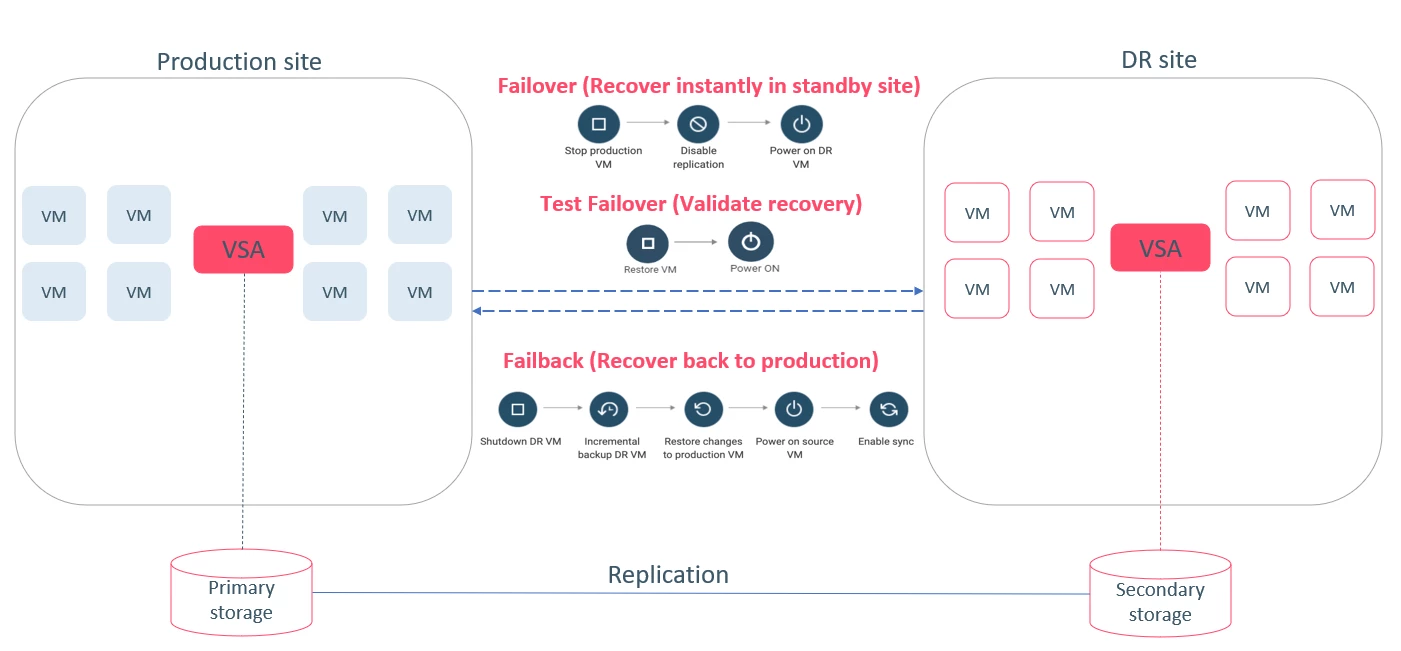
The platform also streamlines ongoing operations with pre-built workflows, allowing for one-click failover and failback orchestration, reducing the time and effort required to recover data.
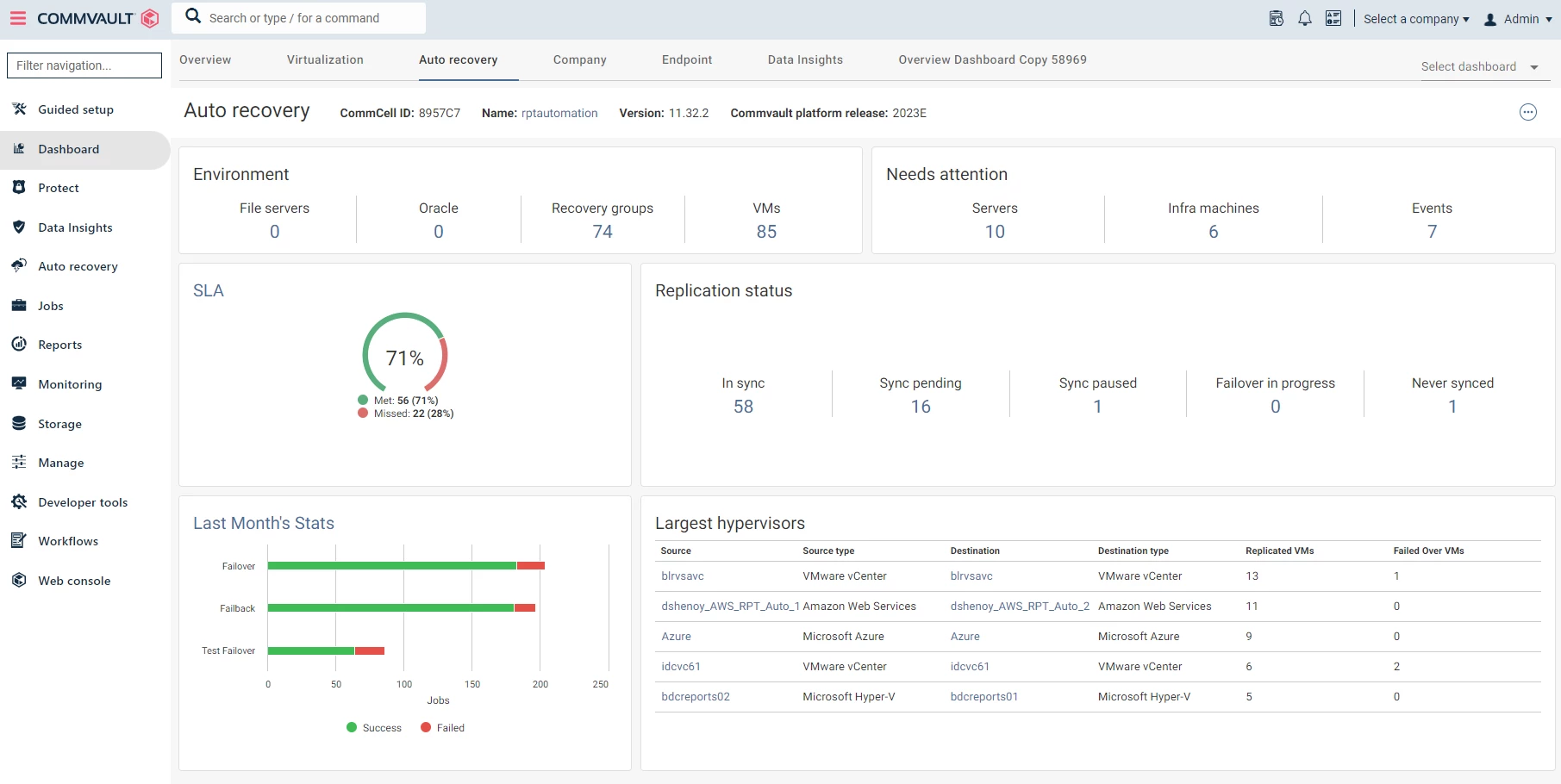
Commvault Auto Recovery provides a centralized dashboard that allows you to view and manage all your resources, regardless of the environment they are in. This helps enhance operational efficiency and agility, allowing you to quickly recover data and minimize downtime. Additionally, it offers role-based access control for administrative flexibility, which includes self-service and multi-tenant deployments, making it easier to manage your data recovery at scale.
Support Matrix
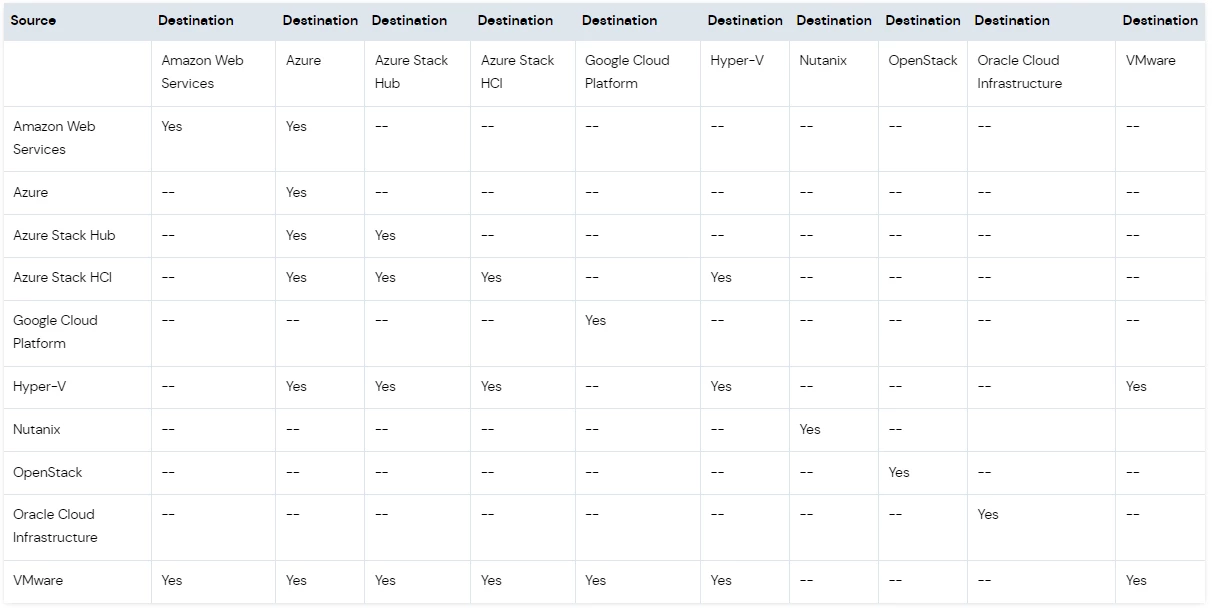
Commvault Auto Recovery supports recovery of multiple workloads such as VM, database, or file/volumes, and enables replication of data from on-premises to cloud, cloud to cloud, or between different public clouds.
For example, a user can replicate their VMware VMs from on-premises to AWS and recover the entire application. Consolidating different disaster recovery needs is a big challenge, but Commvault Auto Recovery offers a comprehensive solution to address all these needs on a single platform. It provides an intuitive management web interface that enables easy management of all disaster recovery operations.
We are continuously updating our platform to add new capabilities, and our supportability matrix is updated with every feature release. With Commvault, enterprises can ensure their critical workloads are protected and recoverable in the event of a disaster, and that their business operations can continue uninterrupted.
What’s Next?
Watch the short video below for an additional, visual overview. And check out the other installments in this series on Auto Recovery to learn more about RPO and RTOs supported, how to use Auto Recovery to protect and recover your workloads from ransomware attacks, and one-click recovery orchestration capabilities.
And please post your questions here in the Community so our product experts can address them!