Question

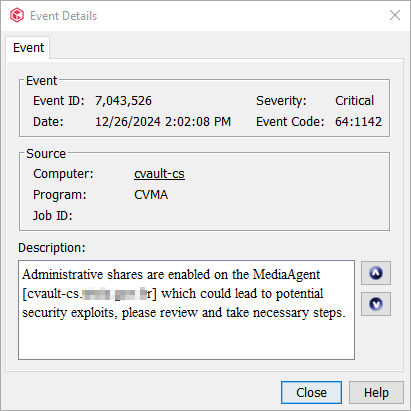
Administrative shares are enabled on the MediaAgent Critical event

  • December 26, 2024
  • 7 replies
  • 490 views

Forum|alt.badge.img+10

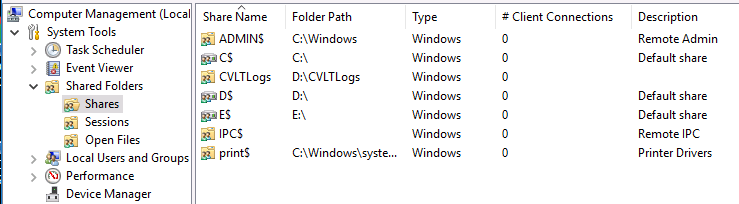
Administrative shares are enabled on the MediaAgent [cvault-cs.xxxx.xxx.xx] which could lead to potential security exploits, please review and take necessary steps. We just updated our Commvault software from Commvault Platform Release 2022E (11.28) to Commvault Platform Release 2023E (11.32.73) and we got this event at the commcell console. cvault-cs.xxxx.xxx.xx is our Windows

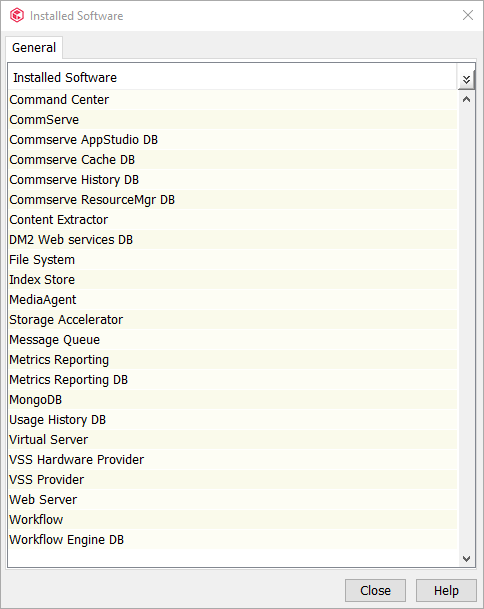
Server 2016 Datacenter commserve. This server is also used for backups of some VMware virtual machines, but there are no Disk Libraries/Mount Paths configured on it.


I read the information on the page MediaAgent - Windows Administrative Shares and I didn't feel very comfortable with it.



7 replies

Forum|alt.badge.img+12
  • Vaulter
  • December 27, 2024

Hi ​@Eduardo Braga 

Kindly refer below Commvault KB and Microsoft link to remove Administrative shares.

https://kb.commvault.com/article/72274

Microsoft's procedure to remove the Admin Shares:
https://learn.microsoft.com/en-us/troubleshoot/windows-server/networking/remove-administrative-shares


Forum|alt.badge.img
  • April 14, 2025

Article 72274 Not Found


Forum|alt.badge.img
  • April 14, 2025

Article 72274 Not Found

  Where is the update article on the subjected? Please advise. Many thanks.


Forum|alt.badge.img+12
  • Vaulter
  • April 14, 2025

Hi ​@Peter Lai ,
Looks like the KB is revoked, let me check this internally. However, kindly refer the MS document for now.


Forum|alt.badge.img
  • Byte
  • November 6, 2025

Do you guys have any resolution on this.?


dude
Byte
Forum|alt.badge.img+16
  • Byte
  • November 6, 2025

@bee check this link: https://support.commvault.com/Article/Details/72274

Opens fine for me.


Forum|alt.badge.img+9
  • Vaulter
  • November 20, 2025