


Solved

Azure VM restore - multiple streams

  • July 5, 2023
  • 5 replies
  • 132 views

Nikos.Kyrm
Community All Star
Forum|alt.badge.img+16

Hello community,

For an Azure VM restore, in order to archive better SLA RTO, is there any way to increase number of streams?

I see that only 1 stream is present as default for every VM restore job.
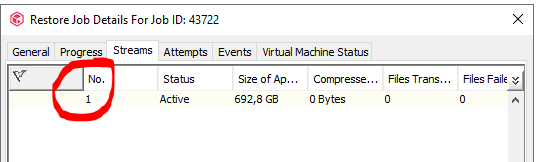


Please for your feedback,
Nikos

Best answer by Sebastien Merluzzi
@Nikos.Kyrm ,


5 replies

Forum|alt.badge.img+14

Hi @Nikos.Kyrm ,

You can use Multi Stream for Files/Folders.

For VM Restore it is only 1 stream / VM.

Best Regards,

Sebastien


Nikos.Kyrm
Community All Star
Forum|alt.badge.img+16
  • Author
  • Community All Star
  • July 5, 2023

@Sebastien Merluzzi 

Thanks a lot for your reply!

Im wondering, because in some Azure VM restore jobs, have throughput ~400 GB/h.
But in this specific Azure VM (in previous screenshot) have restore throughput only ~200 GB/h.
All my tests run only 1 VM restore job at each time in MA (so it is not CPU utilization issue in MA).

That’s why I try to find a way somehow to increase restore throughput!

If you have any idea, please share with me!

Thanks you.


Forum|alt.badge.img+14

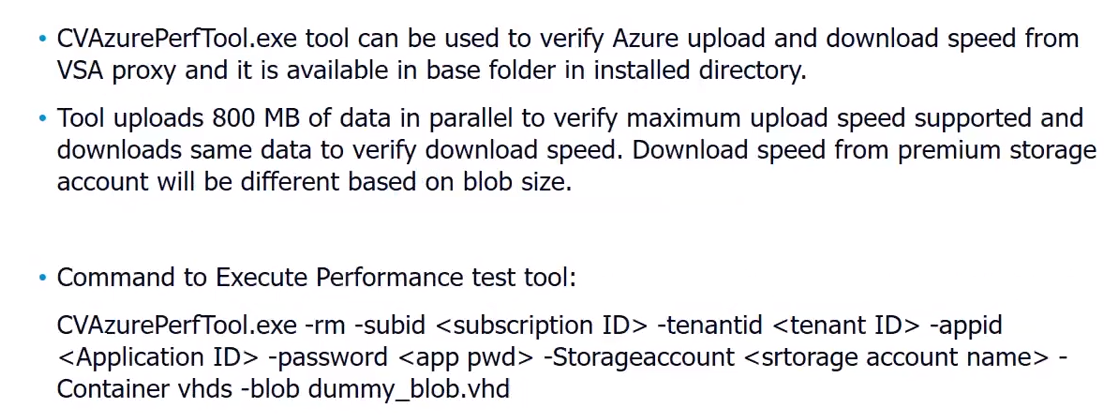
There is a Tool you can use from the Access Node:

CVAzurePerfTool.exe -rm -subid <subscription ID> -tenantid <tenant ID> -appid <Application ID> -password <app pwd> -Storageaccount <storage account name> -Container vhds -blob dummy_blob.vhd


There is another Post you may want to check:


Nikos.Kyrm
Community All Star
Forum|alt.badge.img+16
  • Author
  • Community All Star
  • July 5, 2023

There is a Tool you can use from the Access Node:

CVAzurePerfTool.exe -rm -subid <subscription ID> -tenantid <tenant ID> -appid <Application ID> -password <app pwd> -Storageaccount <storage account name> -Container vhds -blob dummy_blob.vhd


Im not sure what CVAzurePerfTool is about.

From there I can change or monitor the performance of an Azure VM restore ?


Forum|alt.badge.img+14

@Nikos.Kyrm ,



