


Solved

Chenge HANA node order from webconsole

  • Nov 14, 2023 9:37 AM UTC
  • 6 replies
  • 157 views

Forum|alt.badge.img+9

Hi! 


According : 


https://documentation.commvault.com/2023e/expert/22355_configuring_sap_hana_system_replication.html


“The order must be the primary node and the secondary nodes.” 


How to change node order from webconsole? I can select nodes but not set up the order : 
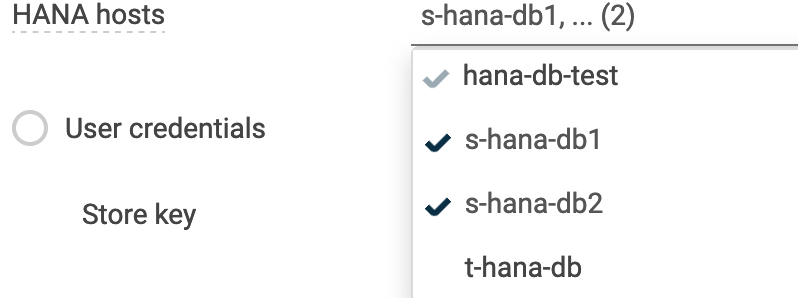
 

From java console node order can be switched using arrows : 
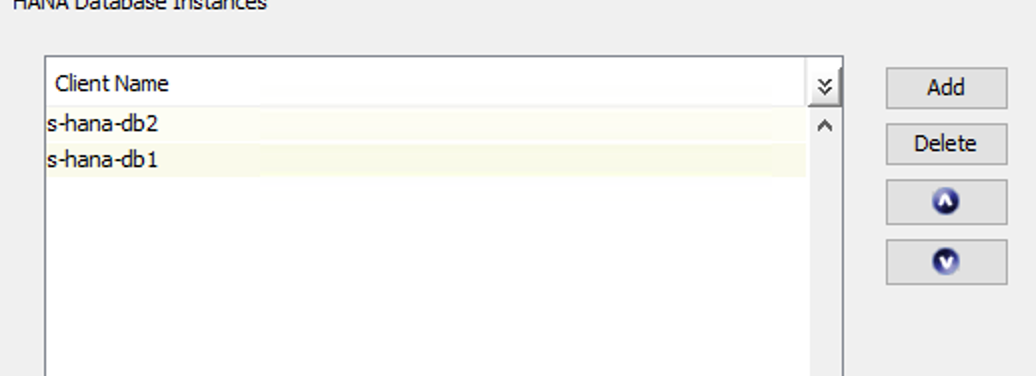


Thanks. 

Best answer by Sunil

Hi @lborek 

This explains. We depend on the ability to access and launch backup on the new primary from the secondary also when failover happens.

secondary HANA is not accessible using SQL therefore

Since the SQL access is restricted, this is not working in your case. Only option now is to change the node order in instance properties. We will try to get this addressed in the product in upcoming releases.


Thanks,

Sunil-

View original

6 replies

Sunil
Vaulter
Forum|alt.badge.img+16
  • Vaulter
  • Nov 14, 2023 3:05 PM UTC

Hi @lborek 

This order is not significant any more. You can add the nodes in any order. We create a distributed store key which takes care of finding out the right primary node while running backups.


Thanks,

Sunil-


Forum|alt.badge.img+9
  • Author
  • Explorer
  • Nov 17, 2023 10:03 AM UTC

@Sunil Thanks for fast response. I will ask. our SAP team to test it. 


HANA services need to be up on both noded? What if one machine is down? I’m almost sure we seen error: 


Error code: [18:146]
Description: SAP HANA Error [hdbsql execution Failed. Database may not be online; Otherwise check the connection credentials].
Source: s-hana-db1, Process: ClHanaAgen


when one (probably first) replica node was down and we had to switch the order to secure backup. Can’t test it now unfortunately. 


Sunil
Vaulter
Forum|alt.badge.img+16
  • Vaulter
  • Nov 17, 2023 3:20 PM UTC

Hi @lborek 

If one of the nodes is down, commvault automatically falls back to the next available node.


Regarding the error you see, if you’re using a custom store key, I hope you created the distributed key as documented below. If not please make sure you create a distributed key.

https://documentation.commvault.com/2023e/expert/22335_creating_sap_hana_hdbuserstore_key_01.html


Thanks,

Sunil


Forum|alt.badge.img+9
  • Author
  • Explorer
  • Nov 24, 2023 12:54 PM UTC

Input from our SAP team : 


We have HANA scale-up with 1 primary and 1 secondary HANA (using HANA system replication). We don't use active read replication so secondary HANA is not accessible using SQL therefore backup is only possible on primary node. When we had wrong order in the Commvault HANA instance settings - 1st secondary 2nd primary HANA host - then backup was not working. We had to manually change the order to 1st primary 2nd secondary so that Commvault could take a backup. We have the same hdbuserstore key on primary and secondary


Sunil
Vaulter
Forum|alt.badge.img+16
  • Vaulter
  • Answer
  • Nov 24, 2023 4:49 PM UTC

Hi @lborek 

This explains. We depend on the ability to access and launch backup on the new primary from the secondary also when failover happens.

secondary HANA is not accessible using SQL therefore

Since the SQL access is restricted, this is not working in your case. Only option now is to change the node order in instance properties. We will try to get this addressed in the product in upcoming releases.


Thanks,

Sunil-


Forum|alt.badge.img+9
  • Author
  • Explorer
  • Nov 27, 2023 12:01 PM UTC

Thanks!