we are setting up laptop (desktop/endpoint) backup for a customer. Users should be able to restore their own files, so I'm leaving the plan name out of the package to get the automatic owner assignment - is it right?
Firstly, which way do you actually use to build the package - the Package Creator on Cloud Services website, or a custom package from the installation media? Package Creator wants an account and internet access and not every customer has that, so I'd rather do it locally, but I don't know if that's what people normally do.
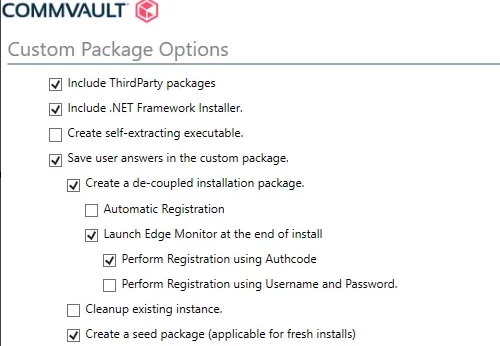
Secondly, in the Custom Package Options the laptop stuff (Launch Edge Monitor, Perform Registration using Authcode) only shows up if I tick "Create a de-coupled installation package". But the docs say de-coupled means the client doesn't register during install and has to be registered later, which sounds like the opposite of what I want.
So is ticking de-coupled actually the correct way to build a laptop package using installation image? Does Edge Monitor just do the registration right after the install finishes? Or am I missing something.
Thank you in advance for your clarification!
Best answer by Jace Ross
Hi drPhil,
The reason the packages are available via so many different means is because there’s no “normal” way to do things, just what works best for your environment. If a custom package works best for you, by all means, go that route.
Registration options such as the authcode option you reference are done as such because if you aren’t installing decoupled then the registration process happens during installation where the interactive installer asks for registration details. The idea is that a laptop package can be installed any time and when the owner is on the company network they can register their laptop at that point. From what you’ve described this is probably not what you are looking for. Also if you are looking to distribute the installer via SCCM, Jamf or similar software management tools I’d recommend checking out this article which outlines a silent install command alongside automatic registration. https://documentation.commvault.com/11.46/software/installing_software_using_third_party_tool.html
The reason the packages are available via so many different means is because there’s no “normal” way to do things, just what works best for your environment. If a custom package works best for you, by all means, go that route.
Registration options such as the authcode option you reference are done as such because if you aren’t installing decoupled then the registration process happens during installation where the interactive installer asks for registration details. The idea is that a laptop package can be installed any time and when the owner is on the company network they can register their laptop at that point. From what you’ve described this is probably not what you are looking for. Also if you are looking to distribute the installer via SCCM, Jamf or similar software management tools I’d recommend checking out this article which outlines a silent install command alongside automatic registration. https://documentation.commvault.com/11.46/software/installing_software_using_third_party_tool.html
Hi @Jace Ross ! Thank you so much for your response.
Indeed, it's fine that there are a lot of options for creating a package, but sometimes a better explanation of the creation process for particular packages would be worth it - e.g. the laptop package.
I can confirm that custom package creation via the cloud website was successful. It's just confusing that there is an option for putting in the auth code, and then you don't need to put the code in when running the silent command for mass distribution.
Nevertheless, creation via the cloud website was a bit more understandable than creation via the installer ISO, where you have to tick de-coupled mode, otherwise you can't get through the following options tied to laptop package creation.
I'll leave this thread open for a couple of days, and if nobody wants to correct or supplement it, I'll close it.
I absolutely understand where you’re coming from. Sometimes the intent behind a feature or function really isn’t as clear as it could be. I’ll be sure to pass on your feedback internally.