




Hi Team,
i tried to do some reseach but can not find any explenation what the
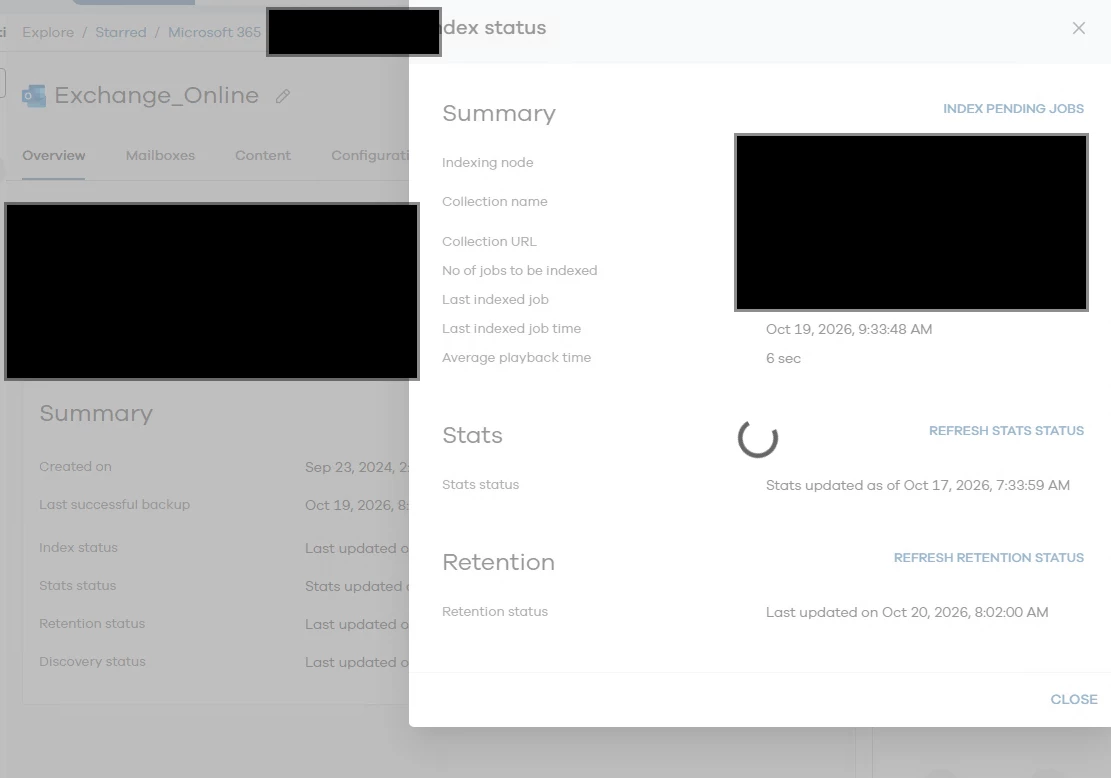
Microsoft 365 - Exchange Online - Stats Status do or what they reflect. Sometimes the Stats status is up to two days in the past
 +2
+2Hi Team,
i tried to do some reseach but can not find any explenation what the
Microsoft 365 - Exchange Online - Stats Status do or what they reflect. Sometimes the Stats status is up to two days in the past
Best answer by Syed_S
Hi
Good day!
The Exchange Online Stats Status represents periodically calculated mailbox statistics, such as mailbox item/content information.
The Stats Status isn't a real-time representation of the latest backup.
By default, Exchange Online mailbox statistics are refreshed once per week.
It does not represent the timestamp of the latest successful backup and is not updated in real time after every backup.
By default, the mailbox statistics refresh occurs weekly. Therefore, it is possible for the Stats Status timestamp to be older than the latest backup while the latest protected data remains available for browse and restore.
A manual Refresh Stats Status can also be initiated when an updated statistics view is required.

Enter your E-mail address. We'll send you an e-mail with instructions to reset your password.

