Solved

reply/forward from web console

  • January 22, 2024
  • 5 replies
  • 106 views

Forum|alt.badge.img+2

anyone has experience about reply/forward email exchange that has been archived from web console ? 
environment exchange on prem

Best answer by Chris Hollis


@Tyo 

Looks like the options are hidden by default for some reason. I’ll get confirmation.

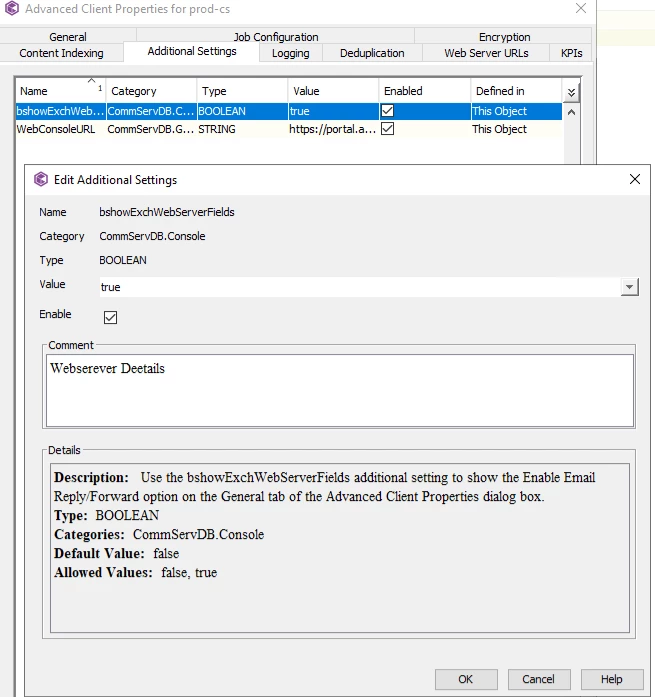
In the meantime, could you please add the following additional setting to your Commserve Client properties then re-try?

https://documentation.commvault.com/additionalsetting/details?name=%22bshowExchWebServerFields%22&id=10564

I tested this and it worked:


Result


You need to then restart the JAVA console for it to be visible. 

Regards,

Chris

 

5 replies

Chris Hollis
Vaulter
Forum|alt.badge.img+14

Hi @Tyo 


You need to setup this feature, instructions are here: https://documentation.commvault.com/2023e/expert/setting_up_message_reply_01.html


Note:
 

Support

  • Message reply is supported for Microsoft Exchange 2007 or later.

  • Message reply is not supported for Office 365 with Exchange.


Any questions please let me know.

​​​​​​​Regards,

Chris 


Forum|alt.badge.img+2
  • Author
  • Novice
  • January 23, 2024

Hello Chriss, 

thanks for information, actually i already did those step,, but i stuck on this parts : 

i cant find how to enable email reply/forward on there ? 

can you help me to suggest where i can found  that setup ?


Chris Hollis
Vaulter
Forum|alt.badge.img+14

@Tyo 

As in, the option ‘Enable Email Reply/Forward’ is not visible to you on the web server client properties? 

Regards,

Chris


Forum|alt.badge.img+2
  • Author
  • Novice
  • January 23, 2024

yup,, we cant see that option on client properties .. so there’s no action can be done  actually


Chris Hollis
Vaulter
Forum|alt.badge.img+14
  • Vaulter
  • Answer
  • January 23, 2024


@Tyo 

Looks like the options are hidden by default for some reason. I’ll get confirmation.

In the meantime, could you please add the following additional setting to your Commserve Client properties then re-try?

https://documentation.commvault.com/additionalsetting/details?name=%22bshowExchWebServerFields%22&id=10564

I tested this and it worked:


Result


You need to then restart the JAVA console for it to be visible. 

Regards,

Chris