I have installed on clients Media Agent and client can communicate with DD.
Best answer by Ponte_Vedra
Hello Pawel,
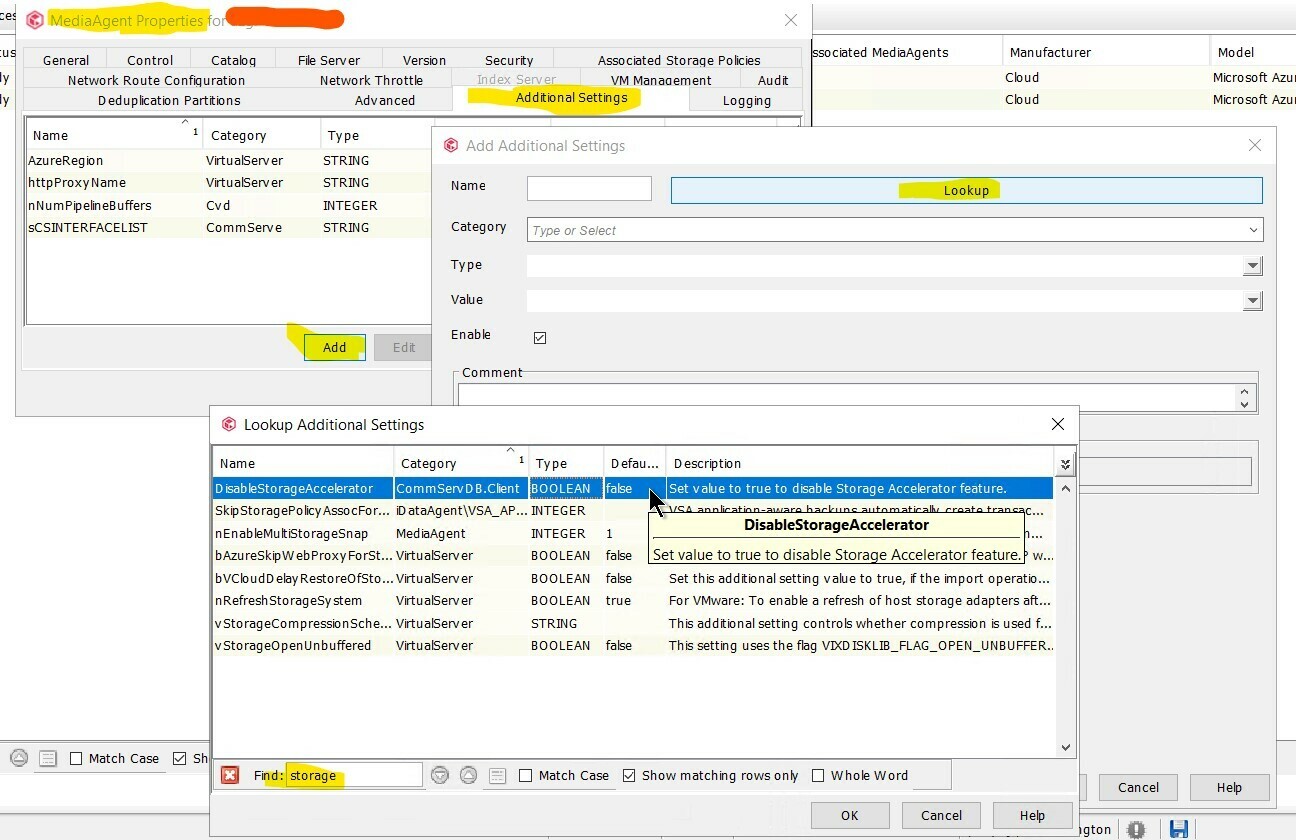
I was able to locate the key to disable storage accelerator - it can be found by navigating to media agent properties → Additional Settings tab → Click Add → Lookup → In the Find text box type storage and it will appear at the top titled DisableStorageAccelerator
Here is a screenshot for reference. Note: Use this same process for Windows or Linux media agents.
I was not able to locae the ConsecutiveFailureCount key - you can try reviewing selections found when using Lookup. It could be a key that requires a support engagement to collect needed details - may be worth checking out if you have no luck hunting it down.
I was able to locate the key to disable storage accelerator - it can be found by navigating to media agent properties → Additional Settings tab → Click Add → Lookup → In the Find text box type storage and it will appear at the top titled DisableStorageAccelerator
Here is a screenshot for reference. Note: Use this same process for Windows or Linux media agents.
I was not able to locae the ConsecutiveFailureCount key - you can try reviewing selections found when using Lookup. It could be a key that requires a support engagement to collect needed details - may be worth checking out if you have no luck hunting it down.